


That 4K label on a retail camera box is often a marketing illusion that fails to deliver usable evidence during a midnight rainstorm. It's a common frustration for Australians who find their security footage is little more than a blurry mess of spider webs and false pet alerts. You know that professional cctv systems should provide clarity and control, but the technical jargon surrounding PoE, NVRs, and 8MP sensors often makes the selection process feel like a gamble. Relying on cheap retail wireless cameras or grey-market stock with no local warranty isn't just a technical risk; it's a compromise on your peace of mind.
In this guide, we'll help you master the technical essentials of professional surveillance to build a reliable, high-performance system for your Australian property. You'll learn exactly how to achieve ultra-high definition results with seamless remote mobile access and smart detection that ignores non-threats. We're breaking down the design process into actionable steps, ensuring you secure genuine hardware backed by local Australian support and a solid warranty. By the end of this article, you'll have the expert knowledge required to design a surveillance setup that delivers total visibility and long-term value for 2026 and beyond.
Key Takeaways
- Understand the technical shift from analogue DVRs to modern IP-based NVR technology for superior high-definition clarity and system longevity.
- Evaluate the reliability of hardwired PoE versus wireless cctv systems to ensure consistent performance in the demanding Australian climate.
- Learn to design a professional surveillance layout by identifying critical zones and overlapping camera views to eliminate vulnerable blind spots.
- Prioritise Australian-approved hardware and local technical support to ensure your system receives essential firmware updates and robust cybersecurity protection.
Understanding Modern CCTV Systems: Components and Architecture
A CCTV system is a closed-circuit network where video signals aren't publicly distributed but are monitored for private security and surveillance purposes. While early versions relied on low-resolution coaxial cables, Modern CCTV Systems have evolved into sophisticated digital ecosystems. In 2026, the standard for any reliable installation is an IP-based (Internet Protocol) network. This shift from legacy Digital Video Recorders (DVR) to Network Video Recorders (NVR) allows for higher data throughput and smarter processing, providing users with total visibility over their property.
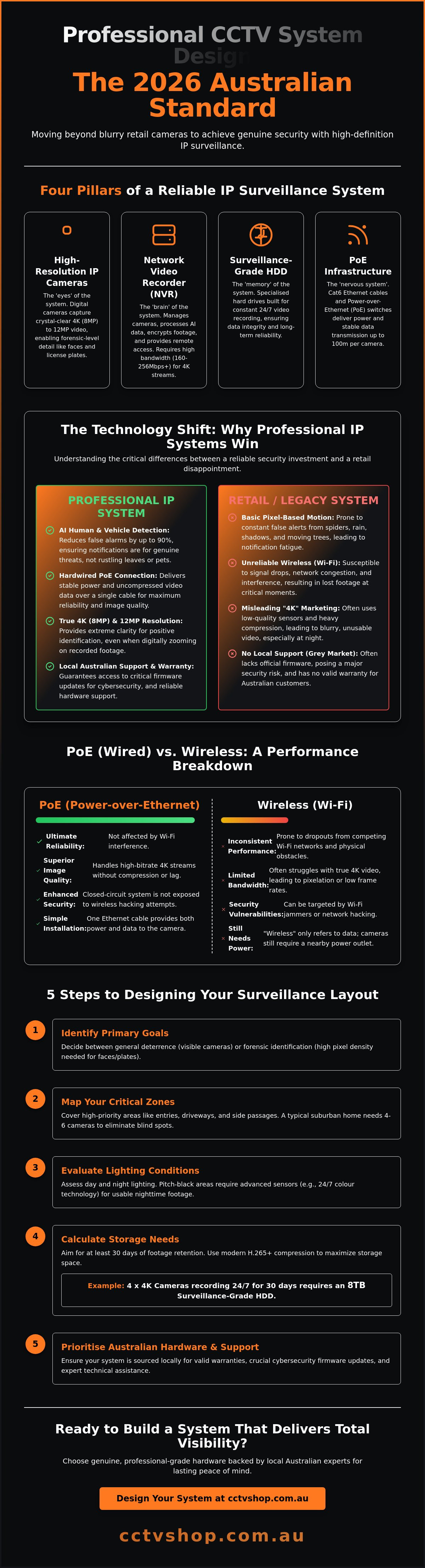
Every professional setup relies on four core pillars to ensure long-term value and protection:
- High-resolution IP cameras: These capture the visual data in ultra-high definition.
- Network Video Recorder (NVR): This serves as the central hub for data management.
- Surveillance-grade Storage (HDD): Specialized hard drives designed for 24/7 write cycles.
- Infrastructure: The physical cabling, typically Cat6, and Power-over-Ethernet (PoE) switches that link the components.
The 2026 benchmark for security is the mandatory integration of AI-driven detection. Older cctv systems often triggered recordings based on simple pixel changes, such as a tree moving in the wind or a passing shadow. Current AI algorithms specifically identify human and vehicle shapes, which reduces false alarms by up to 90%. This precision ensures that when you receive a notification on your smartphone, it represents a genuine security event rather than environmental noise.
The Role of the Network Video Recorder (NVR)
The NVR acts as the brain of your system, managing everything from power distribution to data encryption. When you're selecting an NVR for 4K or 12MP cameras, you must check the incoming bandwidth capacity. A standard 16-channel NVR often requires at least 160Mbps to 256Mbps of throughput to handle high-bitrate streams without frame loss. Most units in our Australian stock include built-in PoE ports. This allows a single Ethernet cable to carry both power and data to each camera, which creates a seamless, one-cable installation path for homeowners and professional installers.
IP Cameras vs. Analogue: Why Digital Wins
Digital IP cameras outperform analogue systems in every measurable category. While analogue cameras traditionally peaked at 2MP or 5MP, IP cameras easily achieve 4K (8MP) and 12MP resolutions. This clarity is vital for identifying faces or license plates at a distance. Because the signal is digital, these cameras perform edge analytics directly on the hardware, processing metadata before it even reaches the recorder. PoE technology also enables reliable data transmission over 100-metre cable runs without the signal degradation common in old copper-based systems. Choosing IP ensures your cctv systems remain compatible with future software updates and local technical support requirements.
How to Choose the Right CCTV System for Your Property
Selecting cctv systems requires a methodical approach to ensure the hardware meets your specific security risks. You shouldn't simply buy the highest resolution camera available; you need to match the technology to the environment. Follow these five steps to design a reliable setup.
- Step 1: Identify your primary goals. Decide if you need general deterrence or forensic identification. Deterrence relies on visible camera placement to discourage intruders. Identification requires high pixel density to capture facial features or number plates that hold up in court.
- Step 2: Calculate your zones. Divide your property into high-priority areas like the front entry, driveway, and side passages. A standard Australian suburban home typically requires 4 to 6 cameras to eliminate blind spots.
- Step 3: Evaluate lighting conditions. Check the ambient light in each zone. Areas with streetlights might only need standard sensors, while pitch-black side alleys require 24/7 colour technology.
- Step 4: Select recording capacity. Most users aim for 30 days of footage retention. Using H.265+ compression technology, a 4-camera 4K system generally requires an 8TB surveillance-grade hard drive to meet this 30-day target.
- Step 5: Match features to challenges. Use specific hardware to solve environmental issues. If you have heavy foliage, you'll need AI-driven filtering to prevent false alarms.
While technical specifications are vital, you must also consider the legal considerations for surveillance to ensure your system respects privacy laws while protecting your assets. This balance ensures your footage remains admissible if an incident occurs.
Matching Resolution to Your Field of View
Resolution should be determined by the distance to your target. A 4MP camera is often sufficient for indoor rooms or small courtyards where the subject is within 5 to 7 metres. For driveways or street-facing views, 8MP (4K) is mandatory. The higher resolution allows you to digitally zoom into a recorded frame to see a number plate without the image becoming a blur of pixels. Lens size is equally critical. A 2.8mm lens provides a wide 100-degree field of view for broad areas; a 4mm lens offers a narrower 80-degree view with better detail at a distance.
Advanced Smart Features: AcuSense and ColorVu
Modern cctv systems now include AI-driven features that significantly reduce "notification fatigue." Hikvision AcuSense uses deep-learning algorithms to distinguish between humans, vehicles, and irrelevant movements like swaying branches or heavy rain. This ensures you only receive an alert when a genuine threat is detected. For environments with zero ambient light, Hikvision ColorVu technology uses an F1.0 super-aperture and high-performance sensors to produce full-colour images in the dark. You can learn more about these specific technologies in our Ultimate Guide to Hikvision Security Systems.
If you're unsure which combination of lenses and AI features fits your block, you can always request a custom equipment list from our local technical team to ensure your 2026 upgrade is seamless.
PoE vs. Wireless Security Cameras: A Performance Comparison
Selecting the right transmission method determines the long-term viability of your cctv systems. While the market is flooded with "plug-and-play" wireless options, professional security standards in 2026 still heavily favour Power over Ethernet (PoE). Australian conditions, particularly the intense UV radiation and extreme heat, test the limits of consumer-grade hardware. Hardwired systems provide the electrical resilience needed to operate 24/7 without the signal degradation caused by atmospheric interference or physical obstructions.
The Stability of Wired Infrastructure
PoE technology uses a single Cat6 cable to deliver both high-speed data and electrical power. This infrastructure supports 4K video streaming at bitrates of 15 to 25 Mbps per camera without the latency issues that plague Wi-Fi networks. Because the data travels through shielded copper, it's immune to the signal jamming or frequency crowding common in urban Australian suburbs. These NVR-based systems offer a "set and forget" experience, recording locally to hard drives rather than relying on inconsistent cloud uploads. You can learn more about these components in our Security Cameras Systems: The Comprehensive 2026 Buyer’s Guide.
When to Use Wireless or Solar Solutions
Wireless and solar cameras, such as those in the Reolink range, are excellent for specific "problem areas" like remote front gates, detached sheds, or rental properties where drilling isn't permitted. On rural Australian properties, these units often require high-gain antennas to maintain a stable link over distances exceeding 20 or 30 metres. It's vital to understand the trade-offs; most battery-powered units only record during motion events to conserve energy. This differs from PoE cctv systems that capture every second of footage. If you choose solar, ensure the panel receives at least 4 hours of direct Australian sunlight daily to offset the power draw of night vision LEDs.
Professional installers almost exclusively use PoE for permanent residential and commercial setups for one reason: reliability. The long-term cost of ownership for battery systems is often higher than expected. When you factor in the time spent climbing ladders to recharge units every few months and the potential cost of replacing degraded lithium-ion cells after three years of exposure to the Australian sun, the upfront investment in cabling pays for itself. A wired system ensures that when a security event occurs, the camera is powered, connected, and recording in full resolution without fail.
Step-by-Step: Designing Your Surveillance Layout
Designing an effective layout for modern cctv systems requires more than just pointing a lens at a fence. A professional installation starts at the primary entry points. You should prioritise the front door, back door, and any ground-floor windows that are obscured from street view. These are the highest-risk areas where intruders typically attempt access. Don't overlook side gates or garage entries, as these often provide cover for unauthorised movement.
Eliminating the blind spot problem is the next priority. We recommend a "check and balance" approach where cameras have overlapping fields of view. This ensures that if an intruder attempts to tamper with one unit, their actions are captured by another. For a professional finish, plan your cable runs early. Using UV-rated conduits and IP66-rated junction boxes protects your cabling from the harsh Australian sun and prevents moisture ingress. It also makes the system look integrated rather than an afterthought. It's much easier to hide cables during the design phase than to fix messy wiring later.
Finally, ensure your NVR is positioned near a stable internet uplink. High-resolution 4K streams require consistent upload bandwidth for remote viewing to function without lag. If your router is in a different room, run a dedicated Cat6 cable to the NVR location. This maintains a reliable connection to your mobile device, allowing for seamless alerts and real-time monitoring when you aren't home.
The Art of Camera Placement
Mounting cameras at a height of 2.4 to 3 metres provides the ideal balance between capturing clear facial features and keeping the hardware out of reach from vandals. If you mount too high, you'll only see the tops of heads; too low, and the camera is easily covered or damaged. Be mindful of backlighting from the afternoon sun or high-intensity streetlights, as these can wash out images. For a deeper dive into technical setup, read our guide on how to choose and install a professional security camera system in 2026.
Storage Calculations: How Much HDD Do You Need?
Modern cctv systems utilise H.265+ compression, which reduces file sizes by up to 70% compared to older standards without sacrificing image quality. A reliable rule of thumb for 2026 is to allocate 2TB of storage for every four 4K cameras to achieve roughly 14 days of continuous recording. Always select surveillance-grade drives, such as WD Purple or Seagate SkyHawk. These are engineered for 24/7 write cycles, unlike standard PC hard drives which often fail under the constant load of high-definition video data.
Ready to build a system that covers every angle? Browse our range of professional CCTV kits or speak with our Australian support team for a custom layout plan.
Why Quality Hardware and Local Support Matter
Investing in cctv systems is about more than just buying cameras; it's about securing your future peace of mind. While international marketplaces offer low prices, "grey market" imports carry significant risks. These units often lack the correct regional firmware, which prevents them from accessing official Australian update servers. In 2026, where cybersecurity threats evolve daily, missing a single security patch can leave your entire home network vulnerable. Genuine hardware ensures you receive local updates that maintain both feature parity and robust digital protection.
Australian Stock and Warranty Protection
Choosing local stock means you're backed by Australian Consumer Law and manufacturer-direct warranties. If an NVR power supply fails or a camera sensor develops a fault, you won't have to spend A$50 or more on international shipping to return the unit to an overseas warehouse. International claims often take 30 days or longer to resolve, leaving your property unmonitored during the wait. Always verify that your equipment carries the "Genuine Australian Stock" label. This ensures the hardware is built for local conditions, uses the correct voltage, and includes a valid warranty that can be serviced right here in Australia.
Technical Support: The DIY Safety Net
Big-box retailers and global e-commerce sites are designed for high-volume transactions, not technical troubleshooting. They can't provide guidance when you're dealing with a forgotten "admin" password or a complex IP conflict on your network. CCTV Shop fills this gap by acting as your technical partner. We offer a solution-first approach that prioritizes your system's performance over simple sales figures. Our specialists provide the expertise needed to navigate advanced configurations like AI-driven perimeter protection or secure remote viewing settings.
This professional DIY model offers the ultimate value. You save on installation costs while retaining the safety net of expert technical backup. It's the most reliable way to ensure your cctv systems are configured correctly from day one. When you choose quality hardware supported by local experts, you aren't just buying gear; you're securing a long-term safety solution that works when you need it most.
Take the next step in your security journey: Explore our range of professional CCTV systems at CCTV Shop.
Secure Your Property with 2026 Ready Technology
Building a reliable surveillance network requires a balance of high-performance hardware and strategic placement. Choosing the right cctv systems in 2026 means prioritizing 4K resolution and AI-driven analytics to ensure total visibility across your perimeter. Whether you select a hardwired PoE setup for maximum stability or a flexible wireless solution, your hardware must withstand Australian environmental conditions while providing seamless remote access for your peace of mind.
Quality hardware is only half the battle; local expertise ensures your investment delivers long-term value. As an Authorised Australian Hikvision and Dahua Partner, we provide more than just equipment. Every purchase includes free technical support to help you navigate complex configurations. We maintain a deep inventory of local stock to guarantee fast nationwide shipping, ensuring you don't have to wait weeks for critical security components. You'll find that having a trusted specialist in your corner makes the difference between a basic camera and a comprehensive protection strategy.
Browse our range of professional Hikvision and Dahua CCTV systems today
We're ready to help you design a setup that works perfectly for your unique property and keep your assets protected for years to come.
Frequently Asked Questions
Can I install my own CCTV system in Australia?
You can install wireless DIY kits yourself, but any hardwired system requiring fixed cabling must be installed by a licensed security technician or registered cabler. According to ACMA regulations and various state acts like the NSW Security Industry Act 1997, professional licensing is mandatory for most permanent installations. Using a professional ensures your setup complies with Australian Standards AS/CA S009:2020 for safety and technical reliability.
Do CCTV systems require a monthly subscription fee?
Professional CCTV systems typically don't require ongoing monthly subscription fees because they store data locally on a dedicated hard drive. While many consumer-grade cloud cameras charge between A$5 and A$15 per month for storage, a local NVR setup provides 24/7 recording with zero recurring costs. This approach gives you total ownership of your footage and saves you hundreds of dollars over the system's lifespan.
How many megapixels do I actually need for a home security camera?
For most Australian homes, 5MP to 8MP (4K) resolution is the standard for capturing clear facial details and license plates. A 4K camera provides 3840 x 2160 pixels, which is four times the detail of standard 1080p high definition. Choosing higher resolution allows you to digitally zoom into recorded footage without the image becoming pixelated, which is vital for providing usable evidence to local authorities.
What is the difference between an NVR and a DVR?
The main difference lies in how they process video data; an NVR (Network Video Recorder) works with digital IP cameras, while a DVR (Digital Video Recorder) is used for older analog setups. NVRs are the modern standard for cctv systems because they support higher resolutions and use a single Cat6 cable for both power and data. DVRs require separate power cables for each camera and generally offer lower image quality compared to digital alternatives.
Can I view my CCTV cameras on my phone when I am away from home?
Yes, you can view your live and recorded footage from anywhere in the world using a secure smartphone app. Once your recorder is connected to your home internet router, you'll have 24/7 remote access via encrypted peer-to-peer technology. This feature allows you to receive instant push notifications if your cameras detect movement or a perimeter breach while you're away from the property.
How long does a CCTV system store recorded footage?
Most residential systems are configured to store footage for 14 to 30 days before the oldest data is automatically overwritten. The exact duration depends on your hard drive capacity, the number of cameras, and whether you're recording continuously or only on motion. For example, a 4TB hard drive supporting four 8MP cameras will typically hold approximately 10 days of continuous 24/7 high-quality footage.
Do I need a special hard drive for my security camera system?
You must use a dedicated surveillance-grade hard drive, such as the Western Digital Purple or Seagate SkyHawk series, rather than a standard PC drive. Surveillance drives are engineered to operate 24/7 and can handle the high heat and constant write-cycles of multiple camera streams. Using a standard desktop drive often leads to disk failure within 6 to 12 months due to the heavy workload of a security recorder.
Will my CCTV system work during a power outage?
Your cctv systems will shut down during a power outage unless they're connected to an Uninterruptible Power Supply (UPS). A standard 1500VA UPS can typically keep a four-camera recorder running for 30 to 60 minutes, providing critical protection during short blackouts. For longer outages, you'll need a larger battery backup or a solar-integrated power solution to maintain continuous surveillance of your premises.