


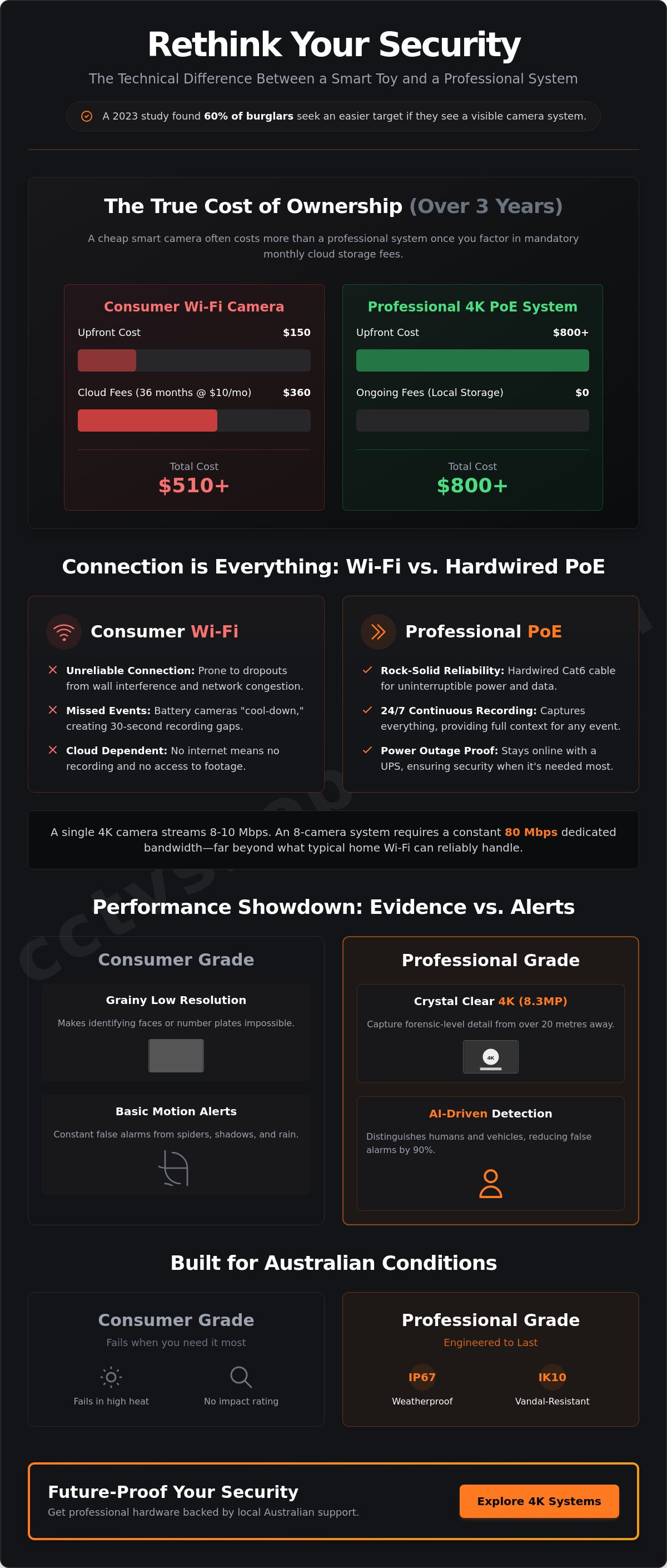
A $150 smart camera often costs you more in monthly cloud fees over three years than a professional 4K system does upfront. You likely already know that relying on consumer-grade gear leads to grainy night vision and constant phone pings caused by a spider crawling across your security camera lens. It's a common frustration for Australians who want real protection rather than just a digital toy. We're here to change that.
This guide provides a technical roadmap to selecting a high-performance system that delivers 4K clarity and intelligent AI alerts without ongoing costs. You'll learn how to bypass common Wi-Fi dropouts by using professional-grade NVRs and Power over Ethernet hardware. We'll walk through the exact steps to install a system designed to last five years or more, backed by local Australian stock and expert technical support. From choosing the right focal length to securing your remote access, we cover the essentials for a flawless setup.
Key Takeaways
- Learn how 2026 surveillance technology has evolved from simple recording to proactive AI-driven deterrence for smarter property protection.
- Understand the technical advantages of a hardwired PoE backbone over Wi-Fi to ensure long-term system reliability and seamless data transmission.
- Identify the essential IP67 and IK10 ratings required for your security camera to withstand the harsh Australian climate and potential vandalism.
- Master the art of site surveys to eliminate blind spots while navigating the critical legal requirements for privacy and public path monitoring in Australia.
- Discover why professional-grade hardware backed by local Australian technical support offers superior peace of mind compared to standard retail kits.
Understanding the Modern Security Camera Ecosystem
The role of a security camera in 2026 has evolved from simple video capture to an active, AI-powered defense system. Modern surveillance focuses on perimeter protection. It uses deep learning to identify threats in real-time. This shift means your system doesn't just record a crime; it works to prevent one. Professional hardware provides a level of reliability that off-the-shelf gadgets can't match. You need to decide between the convenience of cloud-based toys and the robust security of local, NVR-based systems. These professional setups keep your data on-site and accessible without the burden of monthly subscription fees. They offer a stable foundation for long-term property protection.
Deterrence vs. Evidence: What Is Your Goal?
Your strategy dictates your hardware choice. Visible cameras serve as a powerful psychological deterrent. A 2023 study of incarcerated burglars found that 60% would seek an easier target if they spotted a visible surveillance system. However, deterrence isn't enough. You need high-resolution evidence for police and insurance claims. Professional 4K systems provide 8.3 million pixels per frame. This density is vital for identifying facial features or reading a vehicle number plate from 20 metres away. Lower resolution cameras often produce digital noise that makes forensic identification impossible during a critical investigation.
The Problem with Consumer-Grade Wi-Fi Cameras
Many Australian homeowners start with cheap, battery-powered Wi-Fi cameras. These devices often struggle with the local climate and network congestion. Battery units frequently enter cool-down periods to save power. This can result in a 30-second gap where no recording occurs right when an intruder is active. Signal interference in dense residential areas also causes frequent frame drops or total disconnects. A professional wired security camera system ensures 24/7 continuous recording. It eliminates the risk of missed events. You get total peace of mind knowing every second is captured on Australian-certified hardware, supported by local technical experts who understand our unique environmental challenges.
- AI-Driven Detection: Reduces false alarms by 90% by distinguishing humans from shadows or pets.
- Local Storage: Eliminates recurring costs and ensures high-speed access to footage even if the internet fails.
- Continuous Recording: Captures the context before and after an event, which is often missing in motion-only cameras.
- Professional Durability: Hardware rated for Australian heat ensures your system doesn't fail during a summer heatwave.
Comparing Connection Types: PoE vs. Wireless Systems
Deciding how your security camera communicates with your recorder is the most critical technical choice you'll make. This decision dictates the system's lifespan, its daily performance, and its ability to capture clear evidence when it matters most. Most professional installations in 2026 rely on a hardwired backbone, but wireless technology has its place in specific Australian environments.
The primary challenge for any system is bandwidth. A single 4K ultra-high definition camera requires a steady stream of 8 to 10 Mbps. If you install an eight-camera system, you're looking at a constant load of 80 Mbps. Standard home Wi-Fi networks aren't designed to handle this continuous pressure alongside your phones, TVs, and computers. This is why we recommend a dedicated surveillance network. By using a separate PoE switch, you isolate the video traffic, ensuring your security footage doesn't lag and your home internet remains fast.
Why PoE is the Gold Standard for Reliability
Power over Ethernet (PoE) is the industry benchmark for a reason. It uses a single Cat6 cable to provide both high-speed data and stable power. This eliminates the need for a separate power outlet at every camera location. Professional installers prefer this method because it removes the instability of wireless signals. A hardwired connection isn't affected by thick concrete walls, microwave interference, or a neighbor's overlapping Wi-Fi channel.
PoE also allows for centralized power management. When you connect your cameras to a PoE switch or NVR backed by an Uninterruptible Power Supply (UPS), your entire security camera network stays online during a power outage. This level of uptime is why 95% of commercial-grade installations across Australia utilize physical cabling. It offers a "set and forget" level of reliability that wireless alternatives can't match.
When to Choose Wireless or Solar-Powered Cameras
There are scenarios where running a cable is physically impossible or cost-prohibitive. If you need to monitor a remote gate, a rural perimeter, or a detached shed, wireless solutions provide a practical alternative. For off-grid sites without any mains power, solar powered security cameras have become a highly effective solution. These systems use high-efficiency panels to keep internal batteries charged, providing 24/7 protection in the most isolated locations.
When distance is the main obstacle, we suggest using high-quality wireless bridges like Ubiquiti. These devices create a "virtual wire" between two points, often reaching distances of over 500 metres with a clear line of sight. This allows you to maintain the high throughput required for 4K video without the expense of trenching through concrete. If you're struggling to map out your cable runs, our team can provide expert advice on system design to ensure your hardware performs exactly as expected.
Essential Features for Australian Surveillance in 2026
Australia’s harsh environment dictates the hardware requirements for any reliable security camera system. In 2026, local conditions like 45°C summer peaks and high UV indices mean residential and commercial units must exceed basic specifications. We recommend hardware with an IP67 rating as the minimum standard. This ensures the housing is completely dust-tight and can withstand immersion in water, which is vital during unpredictable Australian storm seasons. For high-traffic areas or properties prone to tampering, an IK10 rating provides the necessary impact protection to keep the lens and internal components functional after a physical strike. Heat is the silent killer of electronics, so choosing professional-grade gear designed for our climate is a non-negotiable step for long-term reliability.
Overcoming the Night Vision Hurdle
Traditional infrared (IR) technology, which produces grainy black-and-white footage, is no longer the industry benchmark. Modern systems have transitioned to full-color night vision. Technologies like Hikvision ColorVu and Dahua Full-color utilize F1.0 large apertures and high-performance sensors to capture vivid imagery in near-total darkness. A sensor with a 0.0005 Lux rating can turn a dimly lit street into a clear, searchable scene. This detail is critical for identifying clothing colors or vehicle makes, which are often lost in standard IR mode. It’s the difference between seeing a shadow and capturing actionable evidence. High-sensitivity sensors ensure your security camera remains effective 24/7 without relying on intrusive floodlights.
AI-Driven Detection: Stopping False Alarms
Notification fatigue remains the biggest challenge for property owners. Older motion detection systems trigger alerts for every swaying branch or passing insect, leading many users to eventually ignore their apps. AI-based analytics like Hikvision’s AcuSense and Dahua’s WizSense have solved this by focusing on deep learning algorithms. These systems distinguish between humans, vehicles, and non-target objects with up to 98% accuracy. Key features include:
- Perimeter Protection: Setting virtual tripwires that only trigger when a person or car crosses a specific boundary.
- Target Filtering: Searching through hours of recorded footage in seconds by filtering specifically for "human" or "vehicle" events.
- Smart Search: Reducing the time spent on evidence recovery by allowing users to jump directly to relevant motion events.
By implementing these AI features, you reduce irrelevant alerts and ensure that when your phone pings, it’s a genuine security event. Our team provides Australian stock with the latest firmware to ensure these AI models are optimized for local environments. If you’re unsure which AI tier fits your property, our local technical support can guide you toward a tailored solution that provides total visibility and peace of mind.
Step-by-Step: Planning Your DIY Installation
A successful security camera installation starts with a comprehensive site survey. You need to identify critical blind spots where an intruder could hide or gain access undetected. Focus your efforts on high-traffic entry points like the front door, side gates, and the garage. Privacy is a serious matter in Australia. While you're entitled to protect your property, you must respect the privacy of others. Ensure your cameras aren't pointed directly into a neighbor's windows or backyard. In many Australian jurisdictions, capturing high-resolution footage of public footpaths can lead to legal complications if it's deemed intrusive. Always check your local council regulations before finalising your mounting points.
Identifying Vulnerable Points and Camera Placement
Effective placement involves a calculated trade-off between height and angle. Mounting a security camera too high provides a wide view but often results in seeing the top of a person's head rather than their face. For effective facial recognition, aim for a mounting height of 2.5 to 3 metres. This height keeps the unit out of reach while maintaining a clear line of sight to facial features. You'll find more technical details in our guide on how to position security cameras for maximum coverage. Consider these areas first:
- Front Door: This is the primary entry point for 34% of residential burglars.
- Side Gates: These provide shielded access to the rear of the property and require dedicated coverage.
- Garage and Driveway: These are common targets for high-value tool and vehicle theft.
The Hardware Checklist: NVRs and Hard Drives
Choosing the right back-end hardware is just as important as the security camera itself. A dedicated Network Video Recorder (NVR) is superior to using SD cards because it offers centralised management and far greater storage capacity. SD cards often fail under the constant write-cycles required for high-definition recording. When selecting storage, never use a standard PC hard drive. Surveillance-rated drives, such as WD Purple, are engineered for 24/7 operation and can handle the simultaneous data streams from multiple cameras without dropping frames.
Don't forget the physical protection of your connections. Junction boxes are essential for protecting cable connections from the harsh Australian sun and heavy rain. They provide a waterproof seal and a professional finish to the install. Once your hardware is mounted, your roadmap involves running Cat6 cabling back to the NVR using Power over Ethernet (PoE) for a single-cable solution. This leads into the initial configuration of IP addresses and motion detection zones within the NVR interface.
Future-Proofing Your Security with CCTV Shop
Investing in a professional security camera system is about more than just hardware; it's about securing your property with equipment built to last. Retail kits often seem attractive due to low upfront costs, but they frequently lack the processing power and build quality required for 24/7 Australian conditions. Professional systems use superior components that resist the harsh UV exposure and coastal salt spray common in many regions across the country. By choosing professional-grade gear, you ensure that your footage is clear when it matters most, rather than finding a failed sensor during a critical incident.
A modular approach is the most cost-effective way to build a high-end system. You don't need to install 16 cameras on day one. By selecting a high-capacity Network Video Recorder (NVR) initially, you can start with two or three essential cameras and expand your coverage as your budget allows. This prevents the "buy twice" trap where homeowners outgrow limited retail bundles within 12 months. Over a five-year period, the total cost of ownership for a professional system is often lower because you aren't constantly replacing failing consumer units.
Why Local Technical Support Matters
Setting up a modern security camera involves complex configurations like port forwarding, secure remote access, and AI-driven perimeter protection. When you buy from an Australian-owned specialist like CCTV Shop, you gain access to local experts who understand these technical hurdles. We help you get the specification right the first time, ensuring your system integrates seamlessly with your local network. This eliminates the frustration of dealing with overseas call centers or generic manuals that don't address specific Australian ISP configurations. Our local warranties mean that if a component fails, you're supported by Australian consumer law and local stock replacements.
Transitioning to Professional-Grade Protection
Brands like Hikvision and Dahua represent the gold standard for both residential and commercial applications in 2026. These systems offer ultra-high definition clarity and advanced features like AcuSense or TiOC that consumer brands simply can't match. Transitioning to this level of hardware is a strategic move that prioritizes long-term reliability over short-term savings. Professional gear provides the ultimate peace of mind because it's designed for high-duty cycles and consistent performance.
If you're ready to upgrade your property's defense, browse our curated selection of the best home security cameras to find a solution that offers genuine protection. Investing in professional gear ensures you remain in control of your safety for years to come.
Future-Proof Your Australian Property Today
Selecting the right security camera system for 2026 depends on balancing advanced AI-driven analytics with robust hardware. Whether you opt for the stability of a PoE network or the flexibility of high-speed wireless, your focus should remain on long-term reliability and clear perimeter protection. A successful DIY installation starts with a meticulous site plan and ends with professional-grade components that offer 24/7 visibility.
CCTV Shop is 100% Australian owned and operated, providing you with genuine local stock and expert technical support for every DIY project. As an authorised partner for both Hikvision and Dahua, we ensure you have access to the latest firmware and local warranties. You don't have to navigate technical hurdles alone; our specialists are ready to guide you through the configuration process to ensure your system performs exactly as intended.
Secure your property with professional-grade Hikvision and Dahua systems from CCTV Shop
Your safety is a long-term investment, and we're here to help you get it right from day one.
Frequently Asked Questions
Can I install a security camera system myself or do I need a pro?
You can install many modern systems yourself, especially plug-and-play PoE kits that use a single cable for power and data. These DIY-friendly options save on labor costs and are designed for straightforward setup. If your project requires complex wiring through internal walls or the installation of new 240V power points, you must hire a licensed Australian electrical contractor to ensure the work meets local safety standards.
How much storage do I need for 4K security cameras?
A standard four-camera 4K system typically requires 4TB to 8TB of storage to keep 14 days of continuous footage. Most professional recorders use H.265 compression, which reduces file sizes by 50 percent compared to older formats. If you set your system to record only when it detects motion, a 2TB hard drive can often store over 30 days of high-resolution video.
Do security cameras work if the internet goes down?
Yes, your security camera system will continue to record to the local NVR or DVR hard drive even without an internet connection. You won't lose any footage during a network outage because the cameras are physically linked to the recorder. You'll only lose the ability to view live feeds on your phone or receive mobile alerts until your NBN or 4G connection is restored.
What is the difference between an NVR and a DVR?
An NVR (Network Video Recorder) works with digital IP cameras, while a DVR (Digital Video Recorder) is designed for older analogue cameras using coaxial cables. NVRs are the industry standard in 2026 because they support higher resolutions and advanced AI analytics. Most NVR systems use Power over Ethernet, which simplifies installation by running just one cable to each camera location.
Are wireless security cameras really wireless?
Most wireless cameras still need a physical power cable connected to a wall socket, even though they transmit data over Wi-Fi. Only battery-powered or solar-powered models are 100 percent wire-free. While these offer flexibility, a hardwired security camera is generally more reliable for 24/7 monitoring because it doesn't suffer from signal interference or battery depletion during cold Australian nights.
How many security cameras do I need for a standard Australian home?
A typical three-bedroom Australian home usually requires four to six cameras to cover all entry points and blind spots. You should prioritize the front door, driveway, and any side gates or rear sliding doors. Using wide-angle 2.8mm lenses ensures you capture a broad field of view, which often reduces the total number of units needed to secure the entire perimeter.
Can I view my security cameras on my phone while I am away?
You can access your security camera feeds from anywhere in the world using a secure mobile app provided by the manufacturer. These apps allow you to watch live video, playback recorded events, and receive instant push notifications if a person or vehicle is detected. For smooth 4K streaming, we recommend an NBN connection with an upload speed of at least 10Mbps.