


Why are you still paying a monthly "tax" just to access video footage recorded on your own property? It's a common frustration for Australians who find themselves trapped in ecosystem silos where hardware costs are just the beginning of the bill. If you're tired of juggling multiple apps or deciphering whether you need a Dream Machine or a Gateway, you aren't alone. Mastering ubiquiti and its UniFi ecosystem is the most effective way to reclaim control over your digital environment without the burden of ongoing subscriptions.
You likely want a system that just works, offering 10Gbps throughput and ultra-high-definition surveillance through a single, intuitive interface. We've designed this 2026 guide to cut through the technical jargon and provide a clear path to professional-grade performance. You'll learn how to select the right components for a seamless Australian installation, ensuring your property is protected by a reliable, subscription-free backbone that scales with your needs.
Key Takeaways
- Learn how the "no subscription" model of ubiquiti hardware delivers superior long-term ROI and professional-grade performance for Australian homes and businesses.
- Discover the advantages of integrating UniFi Network and UniFi Protect to manage high-speed connectivity and surveillance within a single, seamless ecosystem.
- Understand the technical requirements for future-proofing your security backbone, including bandwidth management for 4K streams and selecting the correct Australian-standard cabling.
- Compare the user experience of modern app-first controllers against traditional NVR systems to determine the best fit for your security management needs.
- Identify why sourcing local Australian stock is critical for ensuring hardware compatibility and accessing professional technical support for your installation.
What is Ubiquiti and Why is it the Gold Standard for Modern Security?
Since its founding in 2005, Ubiquiti has transformed from a specialist in wireless ISP equipment into a global powerhouse for integrated security and networking. For a comprehensive Ubiquiti company overview, it's clear the brand succeeded by bridging the gap between basic home routers and complex, high-cost enterprise systems. Today, the UniFi ecosystem represents the gold standard for Australian property owners who demand professional-grade reliability without recurring monthly fees.
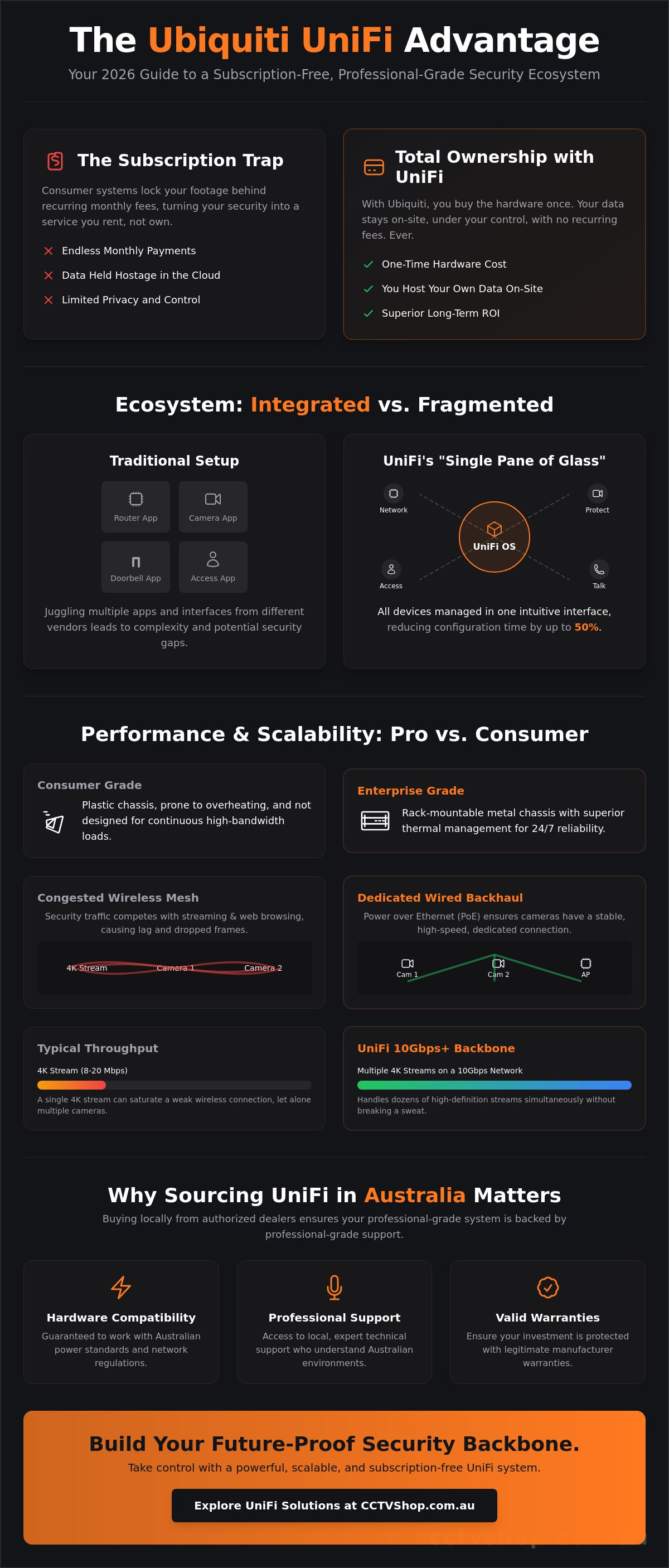
The core value proposition is simple: total ownership. Unlike consumer brands that lock your video footage behind a monthly paywall, ubiquiti hardware operates on a "no subscription" model. You host your own data on your own hardware. This approach provides a superior return on investment, especially for systems with 8 or more cameras where cloud storage costs usually skyrocket. It's a solution-first philosophy that prioritises privacy and long-term value over recurring revenue traps.
In the Australian market, this ecosystem serves two primary groups. It's robust enough for small-to-medium enterprises (SMEs) that need 24/7 perimeter protection, yet it's intuitive enough for large residential builds. Whether you're securing a warehouse in Melbourne or a multi-storey home in Sydney, the integration of networking, surveillance, and access control into a single interface is a game changer.
The Core Components: Hardware vs. Software
The magic of the system lies in UniFi OS. This is the central software that manages every device on your site. It eliminates the need for separate apps for your Wi-Fi, your cameras, and your door locks. Everything is accessible through a "Single Pane of Glass" mobile app or web dashboard. This software is paired with enterprise-grade hardware built for 24/7 operation. While consumer gear is often plastic and prone to overheating, UniFi consoles and switches feature high-quality thermal management and rack-mountable metal chassis. This build quality ensures your security system stays online when it matters most.
Ubiquiti vs. Consumer Mesh Systems
Many homeowners start with off-the-shelf mesh routers, but these often fail in high-bandwidth surveillance environments. A standard 4K security camera can consume 8 to 20 Mbps of continuous bandwidth. When you multiply that by six cameras, a wireless mesh system quickly becomes congested, leading to dropped frames or laggy remote viewing. Ubiquiti solves this by prioritising dedicated wired backhaul. By using Power over Ethernet (PoE) access points, the system ensures that your security traffic doesn't compete with your Netflix stream. This architecture allows for seamless scalability. You can add one camera or one access point at a time as your needs grow, without ever needing to replace the core foundation of your network.
Understanding the UniFi Ecosystem: Network, Protect, and Access
The ubiquiti UniFi ecosystem functions as a single, cohesive platform designed to eliminate the fragmentation common in traditional IT setups. Instead of managing separate vendors for Wi-Fi, security cameras, and door entry, UniFi integrates these services into a centralized console. This "single pane of glass" management style reduces configuration time by up to 50% for complex deployments compared to multi-vendor environments. It's a system built for those who value technical reliability without the overhead of enterprise-level complexity.
- UniFi Network: This provides the backbone of your infrastructure with high-capacity switches and Wi-Fi 7 access points that handle gigabit-plus speeds.
- UniFi Protect: Professional-grade video surveillance that focuses on high-speed playback and 24/7 recording without any ongoing licensing fees.
- UniFi Access: A modern door control system utilizing NFC readers, mobile credentials, and physical fobs for secure business entry.
- UniFi Talk: A subscription-based VoIP solution that bridges the gap between office telephony and network management, integrated directly into the same OS.
UniFi Protect: Surveillance Redefined
UniFi Protect shifts away from the clunky interfaces of legacy NVRs. It prioritizes a high-speed user experience with a timeline-based scrub feature that allows users to review hours of footage in seconds. Advanced AI detection now identifies specific objects like license plates, human figures, or delivery packages with approximately 98% accuracy in optimal lighting conditions. Local video processing remains the critical foundation for ensuring user privacy and near-instantaneous remote access speeds. For high-capacity needs, the UNVR and UNVR Pro offer RAID protection across multiple drive bays. This setup supports months of 4K storage without a single monthly cloud subscription, keeping your data on-site and under your control.
The Dream Machine Series: Your All-in-One Gateway
The gateway serves as the brain of your entire ubiquiti deployment. Choosing the right model depends on your specific hardware requirements and device count. The UDM Pro is the standard for rack-mount installations, while the UDM SE adds integrated PoE (Power over Ethernet) ports to power cameras directly from the unit. For aesthetic-conscious installs or smaller offices, the Dream Wall provides a flush-mount solution with built-in Wi-Fi and high-density switching. These units handle everything from firewall security to hosting the UniFi OS applications. Selecting a gateway with a sufficient PoE budget is vital; for example, a UDM SE provides 130W of total PoE power, which typically supports up to eight standard G5 series cameras. If you're unsure which gateway fits your Australian property, you can always seek expert advice for a custom system design.
Ubiquiti Protect vs. Traditional NVR Systems: Which is Better?
Ubiquiti Protect shifts the focus from the traditional, often clunky web interface to a streamlined, app-first experience. While legacy NVR systems frequently require complex port forwarding or VPNs for remote viewing, Protect offers encrypted cloud-brokered access by default. It's a closed system. This hardware lock-in means Protect software only supports cameras from the same brand. You can't mix and match third-party ONVIF cameras directly into the Protect dashboard, which is a vital consideration for those with existing hardware.
In terms of intelligence, the 2026 AI Engine provides person and vehicle detection that rivals industry leaders. While Hikvision might offer deeper forensic search capabilities in specialized high-end projects, ubiquiti wins on simplicity and long-term value. There are no recurring per-camera license fees. This model can save an Australian small business over A$1,000 in software costs over a five-year period compared to enterprise VMS platforms that charge annual subscriptions.
- User Interface: Modern, responsive mobile app vs. dated, browser-dependent NVR menus.
- Storage: Standard SATA drive bays with easy hot-swap capabilities on the UNVR and UNVR-Pro.
- Smart Detection: Built-in AI for human, vehicle, and animal recognition without needing external servers.
Performance in the Australian Environment
Australian summers regularly push data cabinet temperatures above 45°C. Ubiquiti hardware, particularly the Dream Machine Pro and UNVR, features active thermal management to prevent performance throttling. Remote access is highly optimized for NBN connections. Whether you're on HFC, FTTP, or Fixed Wireless, the low-latency scrubbing in the app feels local. For a deeper look at how these sensors perform against competitors in harsh light, see The Definitive Guide to Video Surveillance Security Cameras in 2026.
The Hybrid Approach: Ubiquiti Network + Third-Party Cameras
Many professional installers choose a hybrid setup. This involves using a high-performance ubiquiti switch to power third-party cameras like Hikvision or Dahua. This approach requires careful VLAN tagging to isolate security traffic from the main business network for maximum privacy. Always calculate your PoE budget before deployment. A standard 24-port PoE switch might have a 95W or 400W total limit. Exceeding this will cause cameras to drop out during IR activation at night when power draw peaks.
Designing a High-Performance Surveillance Network with Ubiquiti
Designing a robust surveillance network requires more than just mounting cameras. It demands a structured approach to ensure your ubiquiti hardware performs under pressure. Start by assessing bandwidth. A single 4K camera stream at 24fps typically consumes 12 to 16 Mbps using H.265 compression. For a 10-camera setup, you'll need a consistent 160 Mbps of internal throughput just for video traffic to avoid stuttering or dropped frames.
Choosing the right backbone is the next critical step for any 2026 installation. While Cat6 is sufficient for current 1Gbps connections, we recommend Cat6A for future-proofing. Cat6A supports 10Gbps speeds and offers superior heat dissipation, which is vital for high-power PoE applications in the Australian climate. For wireless coverage, use the UniFi Design Center to map your floor plan. Strategic Access Point placement ensures your mobile devices maintain a strong signal as you move between zones, preventing connection drops during live view sessions.
Storage needs vary by application. A 7-day retention period works for most residential setups, but Australian businesses often require 30 days of footage for insurance compliance. A UniFi Dream Machine Pro with an 8TB surveillance-grade drive can typically handle four 4K cameras for 30 days. Finally, secure your perimeter. Enable the built-in firewall, enforce 2FA on all admin accounts, and use VLANs to isolate your security traffic from the guest Wi-Fi. This logic keeps your video data private and protected from local network intrusions.
The Role of PoE Switches in Your Security Grid
Your switch is the heart of the system. Basic PoE (802.3af) is fine for static domes, but high-performance PTZ cameras require PoE+ (802.3at) or PoE++ (802.3bt) to power their motors and heaters. Managed switches are non-negotiable for security. They allow you to reboot individual cameras remotely and isolate traffic to prevent lateral movement by hackers. For more layout advice, see The Ultimate Guide to Choosing a Security System for Home Security in 2026.
Remote Management and the UniFi Cloud Portal
The UniFi Site Manager provides a unified dashboard for multi-location monitoring. If you're managing both a home in Sydney and a warehouse in Melbourne, you can toggle between sites instantly. For secure access, Teleport VPN uses the WireGuard protocol to create a one-click encrypted tunnel to your network without complex port forwarding. Customise your push notifications to alert you only for specific events, like "Person Detected" in the driveway after 10 PM, reducing notification fatigue and ensuring you only react to genuine threats.
Sourcing Ubiquiti Gear in Australia: Why Professional Support Matters
Buying ubiquiti hardware from overseas might look like a way to save a few dollars, but it often creates expensive long-term problems. Grey market imports frequently arrive with international power plugs that require clunky adapters. These adapters are prone to overheating and can even void your building insurance in the event of an electrical fire. More importantly, hardware sourced outside official channels lacks the RCM (Regulatory Compliance Mark) or C-Tick certification required for legal operation on Australian power grids. Choosing specialist security wholesalers ensures your equipment is fully compliant with local safety standards and optimized for the local market.
CCTV Shop bridges the gap between raw hardware and a working solution. We don't just ship boxes; we provide the technical context that makes the gear work. Networking is complex. Configuring a secure VLAN for your IoT devices or setting up a site-to-site VPN requires more than just a manual. Our professional support team helps you avoid common pitfalls, such as miscalculating your PoE (Power over Ethernet) budget or choosing the wrong SFP+ modules for your fiber uplinks. This expert guidance transforms a standard purchase into a tailored security infrastructure.
Australian Stock and Local Warranty
Genuine Australian stock comes with the protection of local consumer laws. If a component fails, you won't have to deal with the high costs and long wait times of international shipping. Our local RMA process is designed to get your network back online quickly. We also provide direct access to experts who understand the Australian NBN landscape. Whether you're dealing with FTTN, FTTP, or HFC connections, we know the specific settings required for ubiquiti consoles to handshake correctly with local service providers. This local knowledge is vital for maintaining a stable, high-speed connection in 2026.
Getting Started with Your Ubiquiti Build
You don't need to deploy a full enterprise rack on day one. A "Gateway and One AP" strategy is a perfect starting point for most Australian homes and small businesses. By starting with a Cloud Gateway Max or a Dream Machine Pro, you establish a powerful foundation that can scale. You can add more access points or UniFi Protect cameras as your budget allows. We recommend leaving at least 25% of your rack space empty and choosing a switch with extra PoE capacity to accommodate future growth. This prevents the need for a total hardware replacement when you decide to expand your surveillance coverage next year.
Ready to secure your property with the industry's most intuitive ecosystem? Explore our range of Ubiquiti hardware or contact our experts for a custom design. We'll help you build a system that's reliable, scalable, and fully supported right here in Australia.
Future-Proof Your Security with UniFi
Investing in a Ubiquiti deployment means more than just buying hardware; it's about establishing a unified foundation for your property's digital safety. By 2026, the shift toward integrated software-defined networking and high-definition surveillance is no longer optional for those seeking total visibility. The UniFi Protect ecosystem consistently outperforms traditional NVRs through seamless remote access and reliable perimeter protection. Choosing the right components requires technical precision, but the long-term value of a scalable system is undeniable.
At CCTV Shop, we provide the expert technical support and free DIY installation guides you need to deploy your system with confidence. Every item we sell is official Australian stock, ensuring you receive full local warranty protection and hardware optimized for Australian conditions. Don't leave your network to chance when professional-grade reliability is within reach. Our team is ready to help you navigate the technical specifications to find your ideal security path.
Browse the full Ubiquiti range at CCTV Shop and start building your high-performance network today.
Frequently Asked Questions
Do Ubiquiti cameras require a monthly subscription fee?
No, Ubiquiti cameras don't require any monthly subscription or licensing fees to operate. Once you purchase the hardware, you own the system entirely and can access all features without recurring costs. Your video footage is stored locally on your own hard drives, which provides a significant cost advantage over brands that charge for cloud storage or AI detection capabilities.
Can I use Ubiquiti cameras with a Hikvision NVR?
No, you can't use UniFi cameras with a Hikvision NVR because the hardware is designed to work within a proprietary ecosystem. UniFi Protect cameras require a UniFi OS Console, such as a Dream Machine or a dedicated Network Video Recorder. While the cameras support RTSP for streaming to some third-party platforms, the core security features and management only function within the native UniFi environment.
What is the difference between UniFi and EdgeMax?
UniFi is a software-defined system managed through a single central interface, whereas EdgeMax is a carrier-grade routing line that relies on individual device configuration and Command Line Interface. Most Australian businesses choose UniFi for its seamless integration of WiFi, switching, and security. EdgeMax remains a niche choice for ISP environments where advanced, manual routing control is more important than a unified management dashboard.
Is Ubiquiti easy enough for a DIY installation?
Yes, the ubiquiti UniFi range is highly accessible for DIY installers due to its plug-and-play Power over Ethernet design. You can often complete a basic residential setup in less than 60 minutes using the UniFi mobile app. The software automatically detects new hardware on your network, which removes the need for complex manual IP assignments or technical networking knowledge during the setup process.
Do I need a Dream Machine to use UniFi Protect cameras?
You don't strictly need a Dream Machine, but you must have a device that runs the UniFi Protect application. This can be a Dream Machine Pro, a Dream Router, or a dedicated Network Video Recorder. These consoles act as the brain of your security system. They house the hard drives required for local storage and provide the secure interface for viewing your camera feeds.
How many cameras can a UniFi Dream Machine Pro handle?
A UniFi Dream Machine Pro can manage up to 20 4K cameras or 60 standard HD cameras at once. These performance figures can vary if you're also running high-traffic network services or identity access modules. If your site requires more than 20 4K cameras, we recommend using a dedicated UNVR to ensure your ubiquiti system maintains high frame rates and responsive playback without lag.
Does Ubiquiti work with the Australian NBN?
Yes, UniFi gateways are compatible with all Australian NBN connection types including FTTP, FTTN, and HFC. The hardware supports specific requirements like VLAN ID 100 tagging for providers like TPG or PPPoE credentials for Telstra and Aussie Broadband. This compatibility ensures you can replace your basic ISP router with professional-grade hardware while maintaining your full connection speed across the entire premises.
Can I view my Ubiquiti cameras remotely without a static IP?
Yes, you can view your cameras remotely through the UniFi Protect app without paying for a static IP address from your ISP. Ubiquiti uses a secure cloud-linked portal that maintains a connection to your console even when your dynamic IP address changes. This provides instant, encrypted access to your live feeds and recorded footage from any location with an internet connection.