


With 61% of enterprise-grade recorders now featuring embedded AI analytics, the gap between a basic storage box and a true security hub has never been wider. You’ve likely felt the frustration of navigating bandwidth limits or the fear that your nvr won't support the 8K camera standards of 2026. It’s a valid concern, especially as hard drive prices have surged by up to 60% this year due to AI server demand. You need a system that offers more than just a place to park footage; you need a future-proof investment that guarantees evidence-grade clarity when it matters most.
This guide will help you select the right recorder for your specific environment, whether you're looking at a $389 Hikvision M-Series for a home or a high-capacity 64-channel server. We'll explain how to calculate throughput requirements, why H.265+ compression is essential for saving 75% on storage, and how to stay compliant with Australian privacy and cabling laws. Backed by our local technical support, you'll gain the technical confidence to build a surveillance hub that provides total visibility and genuine peace of mind.
Key Takeaways
- Understand why the modern NVR acts as a specialized server, offering superior digital processing over traditional DVR systems.
- Learn to calculate incoming bandwidth requirements to prevent playback stuttering and ensure your nvr supports future 8K camera upgrades.
- Compare AI-driven analytics like Hikvision’s AcuSense and Dahua’s WizSense to significantly reduce false alarms and search times.
- Identify the critical differences between desktop and surveillance-grade hard drives to maintain 24/7 data integrity.
- Determine the ideal hardware configuration for Australian environments, from simple residential setups to complex, rack-mounted commercial systems.
What is an NVR? Understanding the Hub of Your 2026 IP Security System
A Network Video Recorder (NVR) is a specialized computer system that records video in a digital format to a disk drive, USB flash drive, or other mass storage device. While it might look like a standard media player, the internal architecture is a high-performance server designed specifically for video data. In 2026, the nvr serves as the central nervous system of your IP security setup. It manages incoming streams from multiple cameras, applies smart filters to reduce false alarms, and provides the gateway for secure remote viewing on your mobile device. Because it handles data rather than raw signals, it can act as the primary processor for complex tasks like facial recognition and perimeter protection.
This centralized management allows you to control your entire security environment from a single interface. You can set recording schedules, adjust motion detection sensitivity, and manage user permissions for different staff members or family residents. The modern recorder is built for longevity, offering a stable platform that keeps your footage secure and accessible even during network fluctuations.
NVR vs. DVR: The Technical Divide
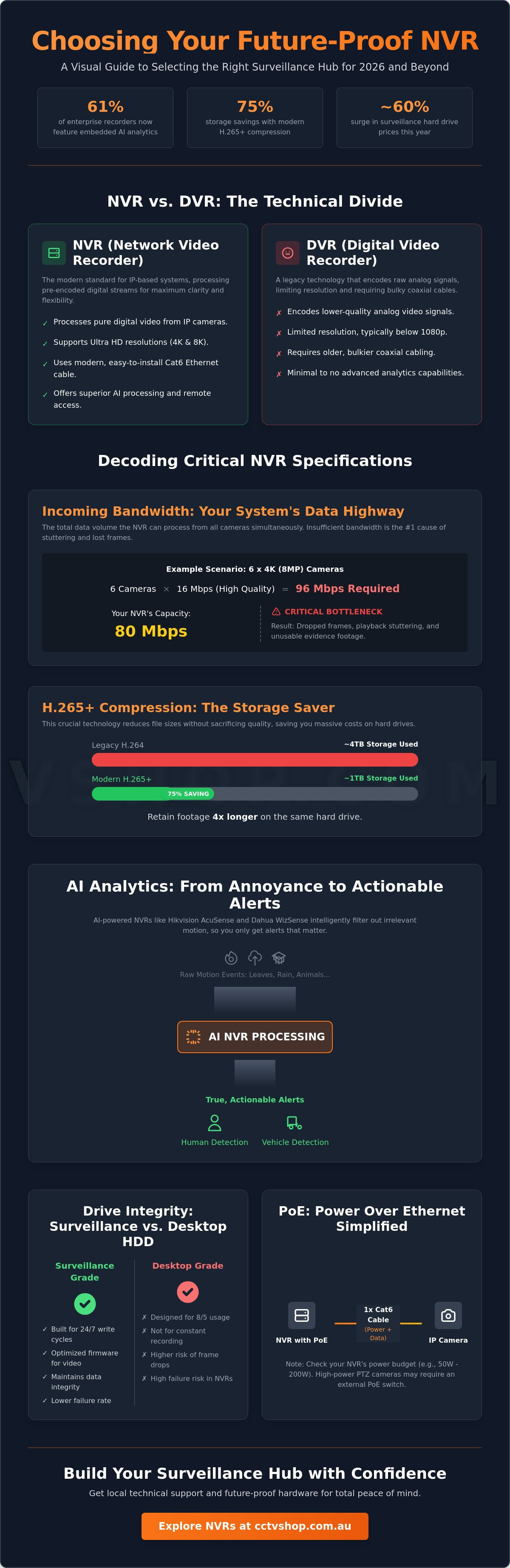
The shift from DVR to NVR represents a fundamental change in how video is processed. In a DVR system, the recorder does the hard work of encoding raw analog signals. This limits resolution and forces you to run bulky coaxial cables. Modern NVRs receive a pre-encoded digital stream directly from the IP camera. This decentralized approach allows for ultra-high-definition 4K and 8K footage without losing clarity over long cable runs. Most Australian installers now favor Cat6 cabling because it's easier to route through tight ceiling spaces and complies with current AS/CA S009:2020 wiring rules. You can find more details in our article on CCTV Systems Explained: The Complete 2026 Guide to Modern Surveillance.
The Role of PoE (Power over Ethernet) in NVRs
Integrated Power over Ethernet (PoE) ports are the standard for 2026 recorders, allowing for a true "plug and play" experience. You run one cable from the camera to the back of the recorder, and it's instantly powered and connected. However, you must calculate the total power consumption of the system. A high-performance nvr typically has a fixed power budget, often ranging from 50W on entry-level units to over 200W on commercial models. If you're using specialized cameras with high-power infrared arrays or motorized zoom lenses, you might exceed the internal budget. In these cases, using an external PoE switch provides better thermal management and allows you to place the recorder in a secure, ventilated rack away from the main cable entry point.
Comparing Key NVR Specifications: Channels, Bandwidth, and Resolution Support
Selecting the right nvr involves looking beyond the number of ports on the back panel. While a 4-channel unit might cover your immediate needs, opting for an 8 or 16-channel model provides essential room for expansion. In 2026, security requirements change fast. Adding a smart doorbell or a dedicated perimeter camera shouldn't force you to replace your entire recording hub. A higher channel count ensures your system can grow alongside your property's needs without redundant hardware costs.
Incoming bandwidth is the most critical specification often hidden in technical datasheets. It represents the total data volume the recorder can ingest from all cameras simultaneously. If you're running multiple 4K cameras, a low-bandwidth recorder will struggle. This leads to dropped frames and stuttering, which can ruin evidence-grade footage. To maintain a reliable system, you must also consider decoding capacity. This determines how many high-definition streams you can view at once on a local monitor. Modern Hikvision and Dahua units now utilize H.265+ compression, which is a massive advantage for storage management. This technology can reduce your storage footprint by up to 75% compared to older H.264 standards, allowing for longer retention periods on the same hard drive capacity.
Decoding Bandwidth Bottlenecks
Calculating your requirements is vital for system stability. A standard 8MP (4K) camera typically consumes between 8Mbps and 16Mbps depending on the frame rate and scene complexity. If you have an 80Mbps nvr, running six 4K cameras at high bitrates will push the processor to its limit. We always recommend leaving a 20% bandwidth overhead. This safety margin ensures the system remains responsive during high-motion events, such as a storm or busy traffic, where data spikes are common. If you're planning a high-density setup, our specialists can help you compare NVR models to ensure your bandwidth matches your camera resolution.
Future-Proofing for 8K and Ultra-HD
The 2026 market is rapidly moving toward 8K resolution. Hikvision’s M-Series recorders are built for this shift, supporting 8K video output via HDMI 2.1. This ensures that the ultra-high-definition detail captured by your cameras actually reaches your screen without loss of clarity. Beyond resolution, hardware longevity depends on consistent firmware updates. These updates are crucial for maintaining cybersecurity and unlocking new AI-driven features. When planning your build, remember that the 24/7 write cycle of these high-resolution streams demands specialized hardware. It's essential to understand the difference between surveillance hard drives vs. standard desktop drives to ensure your data remains intact for years to come.
AI and Smart Analytics: Comparing Hikvision and Dahua NVR Processing
Artificial intelligence has moved from a premium add-on to a standard requirement in 2026. Approximately 61% of enterprise-grade recorders now feature embedded AI analytics, allowing the nvr to do much more than just store video. It acts as a high-speed data processor that indexes metadata such as vehicle types, clothing colors, and facial features. Instead of scrolling through 24 hours of empty driveway footage, Smart Search allows you to find a specific event in seconds. You can simply filter for "human" or "vehicle" and the system presents every relevant clip instantly.
While many modern IP cameras perform initial detection at the "edge," the recorder is responsible for the heavy lifting of database management and alert triggering. This is where brand matching becomes critical. While basic video recording often works across different brands via ONVIF protocols, advanced AI features like Dahua’s WizSense or Hikvision’s AcuSense usually require a matched ecosystem. If you mix a Hikvision camera with a Dahua recorder, you'll likely lose the ability to receive specific smart notifications or use the advanced search filters on your mobile app.
Hikvision AcuSense Integration
Hikvision’s AcuSense technology is designed to solve the problem of false alarm fatigue. By focusing specifically on human and vehicle shapes, these systems can ignore up to 90% of irrelevant motion triggers caused by heavy rain, pets, or swaying trees. Within the nvr interface, you can draw virtual boundaries using "Line Crossing" or "Intrusion Detection" rules. When a person crosses that line, the recorder sends a verified alert to your phone, ensuring you only check your cameras when it's actually necessary. For a deeper look at compatible hardware, see The Ultimate Guide to Hikvision Security Systems: 2026 Buying Guide.
Dahua WizSense and WizMind Features
Dahua takes a similar approach with WizSense, utilizing SMD Plus (Smart Motion Detection) to provide high-accuracy perimeter protection. For commercial applications, their WizMind series offers advanced face recognition databases. You can manage whitelist and blacklist entries directly on the recorder; this ensures that staff movements are ignored while unauthorized visitors trigger an immediate alarm. This level of granular control is what defines a modern, professional security hub. You can explore these capabilities further in our guide to Dahua Security Systems: The Complete 2026 Guide to AI-Powered Surveillance.
Calculating Storage Requirements: Surveillance Hard Drives vs. Standard Desktop Drives
Reliability is the cornerstone of any professional surveillance system. While it's tempting to repurpose an old PC hard drive, an nvr operates in a high-stress, write-heavy environment that standard hardware cannot survive. Your recorder ingests data 24 hours a day, 7 days a week, whereas a desktop drive is designed for intermittent use and frequent "sleep" cycles. Incompatible drives lead to disk errors and, ultimately, the loss of critical evidence when you need it most. Selecting a drive specifically tuned for 24/7 ingestion ensures your footage is there when a security event occurs.
In April 2026, the storage market is experiencing significant volatility, with prices for surveillance-grade drives increasing by 40-60% due to global AI server demand. Currently, a Seagate SkyHawk 4TB is priced at approximately $242.35 AUD, while the Western Digital Purple 4TB sits around $259.95 AUD. For those needing more depth, an 8TB SkyHawk costs about $476.60 AUD. Despite these price shifts, the investment is essential for data integrity. For high-capacity commercial setups, we recommend recorders with RAID configurations. This technology spreads data across multiple disks, ensuring that if one drive fails, your footage remains accessible and protected.
Why Desktop Drives Fail in NVRs
Heat is the primary killer of hard drives in Australian installs. Recorders often sit in unventilated cupboards or small offices where temperatures can exceed 50°C. Surveillance-grade drives are engineered to manage these thermal loads while maintaining low power consumption. Technologies like Western Digital’s AllFrame and Seagate’s ImagePerfect specifically reduce the "frame dropping" that occurs when a drive can't keep up with multiple high-definition streams. Most professional drives include a 3-year warranty, providing a necessary layer of protection for your investment.
Storage Estimation Framework
Bitrate is the primary driver of storage consumption. As a quick rule of thumb for 2026, a single 4K camera using H.265+ compression requires approximately 1TB to 1.5TB of space to store 14 days of 24/7 footage. To get a precise calculation for your specific property, we suggest using the official Hikvision or Dahua storage calculators. These tools account for variables like frame rates and AI-triggered recording, which can significantly extend your retention period. If you're unsure which capacity fits your requirements, you can browse our pre-configured NVR storage bundles to find a tested solution.
Finding the Perfect Match: Selecting an NVR for Australian Homes and Businesses
Selecting the right nvr requires a clear understanding of your environment's specific demands. For residential applications, the priority is usually a balance of cost, silent operation, and a high-performance mobile app. Homeowners in 2026 interact with their systems primarily through smartphones, making the stability of platforms like Hik-Connect and Dahua DMSS essential. These apps are optimized for Australian mobile networks and NBN connections, ensuring you receive push notifications for AI-verified events within seconds. A compact 4 or 8-channel recorder is typically sufficient for a standard home, provided it has the processing power to handle 4K streams without lag.
Commercial requirements demand a more robust hardware profile. Businesses often require rack-mounted recorders that can be secured in a server room. These professional units frequently include dual power supplies for redundancy and advanced multi-user permission settings. This allows a business owner to grant a manager access to live views while restricting the ability to delete or export footage. In high-stakes environments, the ability of the nvr to manage hundreds of simultaneous connections from different staff members is what separates professional-grade hardware from entry-level kits.
Checklist for the DIY Installer
Before finalizing your purchase, ensure your hardware choices align with your installation plan. Use this checklist to avoid common compatibility errors:
- Verify camera compatibility: While ONVIF is a global standard, native protocols (Hikvision to Hikvision) offer the most reliable AI feature integration.
- Confirm the PoE budget: High-draw cameras like PTZs or those with 24/7 color technology require more wattage than a standard bullet camera.
- Resolution matching: Ensure your recorder supports the maximum resolution of your highest-spec camera; an 8MP camera is wasted on a 4MP-limited recorder.
- Thermal management: Plan for ventilation if the unit will be housed in a small cupboard or enclosure.
For a step-by-step walkthrough of the physical setup, read our guide on How to Choose and Install a Professional Security Camera System in 2026.
Why Buy From an Australian Specialist?
The rise of "Grey Market" hardware has become a significant issue for Australian consumers in 2026. These units are often intended for other regions and have their firmware modified to display in English. This creates a nightmare for security; the moment you attempt a firmware update, the recorder may "brick" or revert to its original language, locking you out of the system. By choosing a local specialist, you guarantee access to genuine Australian stock with manufacturer-backed warranties. Our team provides local technical support for password resets and networking issues, ensuring your security hub remains a reliable asset for years to come.
Securing Your Property with Technical Confidence
Selecting the right nvr is a strategic decision that determines the longevity and effectiveness of your entire surveillance network. You've learned how to navigate bandwidth bottlenecks and why H.265+ compression is vital for managing the 40-60% rise in hard drive costs seen in early 2026. Whether you're implementing AcuSense for a family home or a high-capacity WizMind server for a commercial site, the focus remains on reliable, evidence-grade storage that works when it matters most. Professional security is about more than just recording; it's about having total control over your environment.
CCTV Shop has been Australian owned and operated since 2012. As an authorized reseller of Hikvision and Dahua professional hardware, we ensure you receive genuine local stock backed by expert technical support. We include free DIY installation guides with every purchase to simplify your setup process. Browse our range of genuine Hikvision and Dahua NVRs with Australian support and take control of your property's protection today. You're not just buying a recorder; you're investing in a future-proof security hub designed for lasting peace of mind.
Frequently Asked Questions
Can I use Hikvision cameras with a Dahua NVR?
Yes, you can connect Hikvision cameras to a Dahua nvr by using the ONVIF protocol, typically version 2.4 or higher. While basic video recording usually works, you'll likely lose access to advanced AI features like face recognition or specific smart motion filters. For the most reliable "plug and play" experience, we recommend matching your camera and recorder brands to ensure all proprietary metadata is correctly processed.
How many days of recording will a 4TB hard drive hold?
A 4TB surveillance drive generally stores between 14 and 20 days of continuous footage for a standard four-camera 4K system. This estimate assumes you're using H.265+ compression to reduce data loads. If you configure the system to record only during AI-verified motion events, that same 4TB drive can often hold over 60 days of history, depending on the amount of daily activity at your property.
What is the difference between a 4-channel and an 8-channel NVR?
The channel count refers to the maximum number of IP cameras the recorder can manage simultaneously. A 4-channel unit has four physical PoE ports on the back, while an 8-channel model has eight. Even if you only plan to install four cameras today, an 8-channel nvr is a smarter investment for 2026. It provides the necessary capacity to add a smart doorbell or an extra perimeter camera later without replacing your entire hub.
Does an NVR need internet to record video?
No, your recorder doesn't need an internet connection to capture and store footage from your cameras. The system communicates over a local area network (LAN) created by the recorder's internal switch. You only need to connect the system to your router if you want to use remote viewing apps, receive mobile push notifications, or download firmware updates to maintain your system's cybersecurity.
Can I view my NVR on my phone while away from home?
Yes, you can access your live feed and recorded footage from anywhere using the Hik-Connect or Dahua DMSS apps. These platforms use secure P2P (Peer-to-Peer) technology to bypass complex router settings. As long as your recorder is connected to the internet, you'll receive real-time alerts for human or vehicle detections directly on your mobile device, providing total visibility of your Australian home or business.
What happens if my NVR hard drive gets full?
Most professional recorders are set to "Overwrite" mode by default. When the hard drive reaches 100% capacity, the system automatically deletes the oldest hour of footage to make room for new data. This creates a continuous loop of recording that requires zero manual maintenance. You can also configure the system to trigger an audible "HDD Full" buzzer or send an email alert if you prefer to swap drives instead.
Is it better to record 24/7 or only on motion detection?
We recommend 24/7 recording for most professional setups to ensure you never miss the seconds leading up to an incident. Modern systems allow you to record 24/7 at a lower frame rate while "ramping up" to full resolution and high frame rates when AI-verified motion is detected. This hybrid approach gives you the best of both worlds: a complete record of the day and high-detail evidence of critical events.
Do I need a special monitor for a 4K NVR?
You don't need a 4K monitor to operate the system; the recorder will automatically downscale the video to fit a standard 1080p screen. However, you won't see the full ultra-high-definition detail of your 8MP cameras without a 4K display. To get the best results from a 2026 nvr, use a monitor with HDMI 2.1 support to ensure the high-bandwidth video signal is displayed with maximum clarity.