


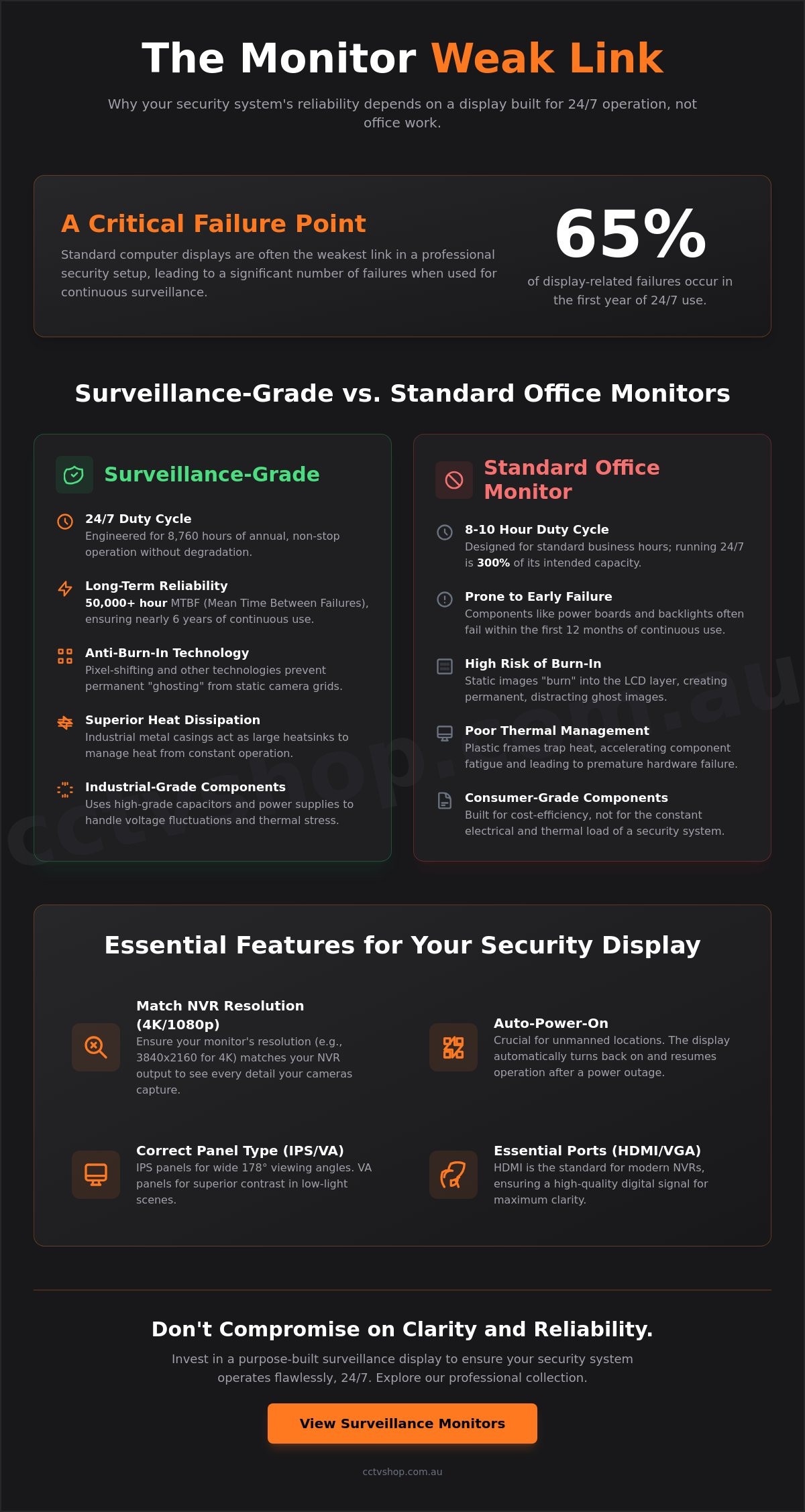
A standard computer display is often the weakest link in a professional security setup, leading to 65% of display-related failures within the first year of continuous operation. It's a common mistake to assume any screen will do, but 24/7 surveillance demands specialized monitors built with a level of engineering that consumer hardware simply can't provide.
You've likely invested significantly in high-resolution Hikvision or Dahua cameras, so it's frustrating when the final image looks pixelated or the screen develops permanent "ghost" images from your camera grid. We understand that you need a system that remains crystal clear whether it's 2 PM or 2 AM. This guide will show you why dedicated surveillance-grade displays are the only way to ensure long-term reliability and how to select a unit that delivers the clarity needed to identify faces or number plates at 30 meters. We'll break down the essential technical specs for 2026, from heat dissipation to seamless NVR integration, ensuring your Australian security system never misses a detail.
Key Takeaways
- Understand why surveillance-grade displays are engineered for 24/7 duty cycles, preventing the premature failure common with standard office screens.
- Learn how to match your NVR’s 4K or 1080p output with the correct resolution and input ports for maximum visual clarity.
- Discover why purpose-built monitors from industry leaders like Hikvision and Dahua outperform domestic TVs in demanding security environments.
- Identify the essential "Auto-Power-On" feature that ensures your security display resumes operation immediately after a local power outage.
- Gain a step-by-step framework for connecting and optimising your NVR to create a professional monitoring station with total visibility.
Surveillance-Grade vs. Standard Monitors: What is the Difference?
A surveillance monitor is a purpose-built display engineered for 8,760 hours of annual operation. While standard office screens serve general tasks, they lack the industrial architecture required for constant uptime. For those seeking a comprehensive Surveillance overview, it becomes clear that the hardware must match the rigorous demands of modern CCTV systems. Professional monitors utilize high-grade capacitors and specialized cooling systems to prevent the hardware fatigue common in consumer-grade equipment. At CCTV Shop, we prioritize these industrial-grade components because they provide the technical reliability our Australian clients expect for long-term security applications.
The 24/7 Reliability Factor
Standard office displays are rated for a duty cycle of 8 to 10 hours daily. Running them 24/7 forces internal components to operate at 300% of their intended capacity. Surveillance-grade panels feature a Mean Time Between Failures (MTBF) often exceeding 50,000 hours, which equates to nearly six years of continuous use. This longevity stems from industrial power supplies that resist voltage fluctuations. Without these specialized components, consumer hardware often experiences power board failure or backlight dimming within the first 12 months of continuous use. Our local technical support teams frequently see standard screens fail in security environments because they cannot dissipate the heat generated by constant operation.
Image Persistence and 'Ghosting'
Security footage often features static camera grids that remain unchanged for weeks. On a consumer TV or office screen, this leads to permanent image persistence, where the grid pattern "burns" into the LCD layer. Professional monitors incorporate pixel-shifting technology and anti-burn-in software to refresh the panel at a sub-perceptual level. This protects the screen's integrity without interrupting the live view. These displays also maintain high color accuracy over time. This ensures that when reviewing footage for evidence, the color of a vehicle or a suspect's clothing remains true to life. This precision is a critical requirement for meeting Australian evidentiary standards during police investigations.
- Heat Dissipation: Industrial metal casings act as heatsinks, unlike plastic consumer frames.
- Duty Cycle: Engineered for 100% uptime compared to the 20% rating of office hardware.
- Component Grade: Uses long-life capacitors to prevent circuit failure under high thermal loads.
- Panel Protection: Integrated logic to prevent static image "ghosting" from fixed camera angles.
Choosing the right display is about more than just a clear picture; it's about ensuring your visibility doesn't fail at a critical moment. By investing in dedicated surveillance hardware, you secure a solution that offers total visibility and peace of mind for years to come.
Key Features to Compare When Buying a Security Monitor
Selecting the right display requires more than just picking a screen size that fits your desk. Unlike standard office hardware, specialised monitors are designed to handle the static interfaces and continuous operation typical of a 24/7 surveillance hub. You need to ensure the hardware specifications align with your recorder's output to avoid bottlenecking your video quality.
While gaming screens boast high refresh rates like 144Hz, these specs are largely redundant for CCTV. Most security cameras record at 15 to 30 frames per second, meaning a standard 60Hz refresh rate is more than sufficient. Focus instead on the panel type. In-Plane Switching (IPS) panels provide 178-degree viewing angles, which are vital if the screen is mounted high or viewed from the side. Vertical Alignment (VA) panels offer better contrast ratios, making them useful for spotting movement in dark, low-light footage.
Resolution and Aspect Ratio
Matching your monitor to your NVR output is critical for clarity. If you've invested in 8MP (4K) cameras, using a 1080p screen will downscale your footage and hide vital evidence. A 4K monitor provides 3840 x 2160 pixels, allowing you to view four 1080p camera feeds simultaneously in full resolution without losing detail. Pixel density refers to the number of pixels packed into every inch of the screen; higher density ensures that fine details, such as characters on a license plate or specific facial features, remain sharp during digital zoom. Most modern systems use a 16:9 aspect ratio, which perfectly accommodates standard multi-camera grid views.
Connectivity and Ports
HDMI has become the industry standard for high-definition surveillance, carrying both 4K video and audio signals through a single cable. However, many Australian commercial sites still rely on legacy DVR systems that require VGA connections. Professional-grade monitors from brands like Dahua and Hikvision often include BNC loop-through ports. This feature allows the raw video signal to pass through the monitor to another device, such as a secondary display or a separate recording unit, without requiring a signal splitter. This hardware redundancy is a hallmark of high-end security installations.
Viewing Angles and VESA Mounting
In a professional monitoring station, screens are rarely sat at eye level on a desk. They're often mounted on walls or suspended from ceilings. Standardised VESA mounts, typically in 75mm or 100mm configurations, allow you to secure the display to articulating arms or heavy-duty brackets. If your screen is mounted above a doorway, an IPS panel is essential to prevent the "wash out" effect that occurs with cheaper TN panels when viewed from below. For more information on setting up your control centre, see our guide on positioning home security cameras.
If you're unsure which panel type suits your specific floor plan, you can always contact our Australian technical team for a tailored recommendation based on your current NVR setup.
Standout Monitors from the CCTV Shop Collection
Selecting the right display requires a balance between technical specifications and operational reliability. At CCTV Shop, we provide a curated selection of Hikvision and Dahua monitors specifically engineered for the rigours of continuous surveillance. Every unit we supply includes Australian-standard power cables and is backed by local warranty support, ensuring your security system remains online without the compatibility issues often found with grey-market imports.
Our range focuses on industrial-grade hardware. Standard office screens often suffer from image persistence or "burn-in" when displaying static camera grids for extended periods. The professional displays in our collection utilize anti-burn-in technology and high-quality liquid crystal panels designed to run 8,760 hours a year. Whether you need a compact screen for a home cupboard or a multi-screen setup for a corporate security desk, these models provide the clarity required for accurate incident identification.
Best for Home Security: Hikvision 21.5" FHD Monitor
The Hikvision 21.5" FHD model is our most popular choice for residential installations. Its narrow bezel design allows it to fit into tight spaces, such as shelving units or small home offices, without sacrificing screen real estate. The energy-efficient LED backlighting reduces power consumption by approximately 30% compared to older display technologies, which is a vital consideration for a device that never turns off.
- 24/7 Operation: Rated for continuous use with industrial-grade internal components.
- Dual Inputs: Features both HDMI and VGA ports for flexible NVR connectivity.
- High Contrast: 1000:1 contrast ratio ensures deep blacks and clear visibility in low-light footage.
Best for Commercial Use: Dahua 27" and 32" 4K Displays
For commercial monitoring hubs, resolution is the priority. The Dahua 4K professional series is designed to maximize the utility of high-megapixel cameras. When you view a 16-channel NVR grid on a standard 1080p screen, each individual camera feed is compressed. By upgrading to a 4K display, you benefit from four times the pixel density, allowing operators to see fine details like license plates or facial features even in multi-window views.
These monitors feature an industrial thermal design. This specialized cooling architecture is essential for server room environments where ambient temperatures can rise by 10 to 15 degrees Celsius. Additionally, the built-in speakers provide a streamlined solution for monitoring audio-enabled cameras without the need for external hardware.
Why Buy Surveillance Monitors from CCTV Shop?
We don't just sell hardware; we provide integrated security solutions. Our technicians offer expert support to help you match your display to your NVR's maximum output resolution, preventing "no signal" errors or degraded image quality. We maintain a local warehouse to ensure fast nationwide shipping across Australia, so your site remains protected without long lead times.
Explore our full range of professional monitors here to find the perfect fit for your security infrastructure.
Common Mistakes When Choosing a Surveillance Display
Selecting the wrong output device can undermine an entire security investment. High-end cameras and NVRs lose their effectiveness if the display can't accurately reproduce the captured data. Many users prioritize camera resolution while treating monitors as an afterthought, leading to critical visibility gaps during live monitoring or playback events.
The TV vs. Monitor Debate
It's tempting to use a spare domestic TV for a security system, but this often results in technical failures. Consumer TVs utilize a process called overscan, which crops approximately 2% to 5% of the image edges to clean up broadcast signals. In a security context, this hidden margin might contain a person's face or a vehicle license plate at the edge of the frame. Unlike dedicated surveillance hardware, consumer TVs rarely feature an 'Auto-Power-On' function. If a power outage occurs, the TV remains in standby mode once power returns, even if the NVR has resumed recording. This leaves the system without a live visual feed until someone manually intervenes.
Panel longevity is another significant factor. Standard TV panels are designed for varied content and limited daily use. When forced to display static camera grids 24/7, these panels often experience ghosting or permanent burn-in within 12 months. Professional surveillance displays are rated for 50,000 hours of continuous operation, nearly triple the 15,000-hour lifespan of a budget consumer television.
Sizing Your Monitor Correctly
Screen size must align with the total number of camera channels to ensure each grid tile is large enough for identification. A 22-inch screen is generally sufficient for 4-channel systems, but 8 and 16-channel setups require a minimum of 27 to 32 inches to maintain usable detail in multi-view modes. Mismatched aspect ratios are a frequent headache; forcing a 4:3 legacy camera feed onto a 16:9 widescreen display creates stretched images that distort the physical proportions of subjects.
- 4-Channel Systems: 21.5-inch to 24-inch displays are ideal for desktop viewing.
- 8-Channel Systems: 27-inch displays provide the necessary real estate for high-definition tiles.
- 16-Channel Systems: 32-inch or larger 4K displays are required to see individual movements clearly.
Resolution plays a vital role when using digital zoom on recorded footage. A 4K display provides 8.3 million pixels, allowing you to enlarge a specific area of the screen without the image immediately breaking into blocks. The relationship between screen size and pixel pitch determines the visual density of the display, dictating how much fine detail remains visible to the human eye at a specific viewing distance. Avoid the mistake of buying a large screen with low resolution, as the resulting "screen door effect" makes it impossible to identify fine details from a distance of two meters or more.
Ensure your system provides the clarity you need by browsing our range of professional security monitors designed for 24/7 reliability.
Setting Up Your Security Monitoring Station
Once you've selected the right hardware, the final step involves precise configuration to ensure your 24/7 surveillance remains uninterrupted. A poorly configured display can bottleneck a high-end NVR, rendering 4K cameras as grainy 1080p feeds. You've invested in quality equipment, so taking ten minutes to calibrate your output settings is essential for achieving total visibility.
Connection and Configuration
Start by using a high-speed HDMI 2.0 or 2.1 cable for 4K data transmission. Standard HDMI cables often lack the 18Gbps bandwidth required for fluid 8MP streams at 60Hz. After plugging in, navigate the Hikvision or Dahua NVR menu. Go to 'System Configuration' and then 'Output' to adjust the 'Output Resolution' to match your monitor's native pixels, such as 3840 x 2160. Test the display for 'dead zones' or signal interference by viewing a solid grey background. If you notice flickering, ensure your video cables stay at least 10cm away from high-voltage power lines.
Mounting and Ergonomics
Proper physical placement prevents fatigue during long periods of observation. Install wall-mounted monitors so the top third of the screen is at eye level. This positioning follows ergonomic standards that reduce neck strain and eye fatigue. For a professional finish, use a dedicated security rack with integrated cable management. Use Velcro straps instead of plastic zip ties to bundle cables; they provide a secure hold without pinching the delicate internal shielding of your HDMI or Ethernet lines. For more detailed hardware integration, refer to our Ultimate Guide to Hikvision Systems for NVR setup tips.
Security monitors require different power settings than standard office screens. You must enter the display's internal menu and disable all 'Eco', 'Sleep', or 'Auto-Standby' modes. If these settings remain active, the screen might power down during a period of inactivity, leaving you blind during a critical security event. Always ensure the screen is set to 'Always On' to maintain constant situational awareness.
Maintaining your station ensures long-term reliability and image clarity. Follow these maintenance protocols every 30 to 60 days:
- Dust Management: Use a dry microfibre cloth to wipe the screen. Never use ammonia-based cleaners, as they can permanently damage anti-glare coatings.
- Thermal Control: Ensure there is at least 5cm of clearance around all ventilation slots. Overheating is the primary cause of backlight failure in 24/7 displays.
- Firmware Updates: Check the manufacturer's local Australian support site for display firmware updates that can improve color accuracy or HDR handling.
By following these technical steps, you ensure your security station operates at peak performance. If you're unsure about specific cable lengths or mounting brackets, our team provides expert advice to help you build a reliable, professional-grade monitoring environment.
Optimise Your 2026 Security Setup Today
Selecting the right hardware is the final, critical step in protecting your property. Standard office screens aren't built for the 8,760 hours of annual runtime required by a modern security system; they often suffer from ghosting or backlight failure within months. By investing in dedicated surveillance displays, you ensure your system delivers 24/7 reliability and clear evidence when it matters most. Focus on high-contrast panels and heat-dissipating chassis to maintain performance over a five year lifecycle.
CCTV Shop remains a 100% Australian-owned and operated specialist, providing the local technical support DIY installers need to get it right the first time. Our surveillance-grade hardware is tested for continuous operation, giving you a professional edge in perimeter protection. Whether you're upgrading a home system or managing a commercial site, our team provides the technical clarity to help you choose with confidence.
Browse our full range of 24/7 surveillance monitors at CCTV Shop and secure the peace of mind you deserve.
Frequently Asked Questions
Can I use a normal computer monitor for my CCTV system?
You can use a standard computer display, but it's not recommended for 24/7 security environments. Standard PC monitors are designed for roughly 8 hours of daily use, whereas purpose-built surveillance monitors feature commercial-grade panels rated for 50,000 hours of continuous operation. These specialized units handle static images better and include superior heat dissipation. Choosing a dedicated display ensures your system remains reliable without the risk of premature backlight failure.
What is the best resolution for a security camera monitor?
A 4K resolution, or 3840 x 2160 pixels, is the current gold standard for modern surveillance displays. This high pixel density allows you to view four 1080p camera feeds in their native resolution simultaneously on a single screen without losing detail. For systems with 8 or more cameras, 4K ensures that digital zooming doesn't result in immediate pixelation. It provides the clarity needed for identifying critical evidence like facial features.
Do security monitors need to be 4K if my cameras are only 1080p?
No, a 1080p monitor is sufficient if your cameras don't exceed 2-megapixel resolution. Using a 4K screen won't technically improve the raw footage quality of a 1080p camera. However, a 4K display provides more screen real estate for the NVR interface and multi-camera grids. If you plan to upgrade to 8MP cameras within the next 24 months, investing in 4K hardware now prevents the need for a future replacement.
Why is my security monitor showing 'No Signal' after a power cut?
This error usually occurs because the NVR hasn't finished its reboot cycle or the power surge caused a handshake failure between the HDMI cable and the display. Check the recorder status lights first to ensure it's receiving power. If the unit is on, unplug the HDMI cable for 10 seconds and plug it back in to force a signal refresh. Our local technical support team often finds that a simple cable reset restores the monitors immediately.
How do I prevent screen burn-in on my surveillance display?
You should use a monitor with built-in pixel shift technology or configure your NVR to cycle through different camera views. Static elements like menu bars or grid lines can cause permanent ghost images on LCD panels after 3,000 hours of unchanging display. Setting a sequence tour where the screen changes views every 30 seconds effectively prevents this. Commercial monitors are specifically engineered with anti-burn-in features to mitigate these risks in 24/7 applications.
What size monitor do I need for a 16-channel NVR system?
A 27-inch to 32-inch monitor is the most effective size for a standard 16-camera layout. On a 16-way split screen, each individual camera feed occupies only 6.25 percent of the total viewing area. A screen smaller than 24 inches makes it difficult to identify small details without full-screening a single channel. For professional control rooms, 43-inch displays are often preferred to maintain visibility of all channels from a distance of 2 metres.
Are Hikvision monitors compatible with Dahua NVRs?
Yes, monitors are brand-agnostic and will work seamlessly across different hardware manufacturers. Since video signals are transmitted via standard HDMI or VGA protocols, a Hikvision display will show footage from a Dahua, Reolink, or Bosch NVR without compatibility issues. You won't lose image quality by mixing brands. The primary requirement is ensuring the display supports the specific output resolution of your recorder, whether that is 1080p or 4K Ultra HD.
Is it better to use HDMI or VGA for security cameras?
HDMI is the superior choice for modern security systems because it supports high-definition audio and video through a single cable. VGA is an older analog standard limited to 1080p resolutions and cannot carry audio signals. HDMI 2.0 cables support 4K video at 60Hz, which is essential for smooth playback of high-frame-rate footage. For cable runs exceeding 15 metres, we recommend using HDMI extenders over Cat6 cabling to maintain signal integrity.