


What if your 4K security cameras are only delivering half their potential because your recorder can't keep up with the data load? Choosing between different nvr's can feel like a technical minefield, especially when you need to ensure your 2026 security upgrade is actually future-proof. You likely already know that high-resolution footage is useless if your hardware stutters during playback or fails to sync with your phone when you're away from home. It's a common frustration for many Australians who find themselves stuck with underpowered recorders that don't support the high bitrate of modern IP cameras.
We're here to provide the clarity you need to secure your property with confidence. This guide will help you master the technical essentials and find the perfect NVR for your surveillance system through our expert-led Australian buyer's guide. You'll learn how to calculate required bandwidth, verify hard drive compatibility, and ensure your setup provides seamless remote access. We'll examine the critical hardware specifications that separate professional-grade Australian stock from budget alternatives, ensuring your investment provides total visibility for years to come.
Key Takeaways
- Understand why modern NVRs act as the intelligent 'brain' of your system, providing significantly higher resolution than traditional DVRs.
- Learn how to balance channel counts with incoming bandwidth to ensure your nvr's performance remains seamless when recording in 4K.
- Discover how AI-driven features like human and vehicle detection can filter out 90% of false alarms for more efficient monitoring.
- Identify the right hardware for your budget, with expert recommendations ranging from entry-level A$200 units to mid-range 4K recorders.
- Secure your investment with access to local Australian technical support and free DIY guides provided with every purchase.
Why NVR's are the 'Brain' of Modern Surveillance Systems
A Network Video Recorder (NVR) serves as the central intelligence hub for digital security setups. It manages, records, and processes high-definition video data captured by IP cameras. Unlike older recording methods, modern nvr's function as dedicated servers designed for one specific task: protecting your property. This hardware handles massive data throughput from multiple high-resolution streams simultaneously, ensuring no frames are dropped during critical incidents. By processing data locally, these units provide a level of reliability that PC-based software or cloud-only solutions cannot match, typically offering 99.9% uptime for 24/7 monitoring.
System stability is paramount when you need to access footage from a remote location. Dedicated recorders are engineered to work seamlessly with Australian mobile networks, providing smooth remote viewing on Telstra, Optus, or Vodafone 4G and 5G connections. While cloud-only recording depends heavily on NBN upload speeds, which can fluctuate during peak hours, an NVR ensures your primary evidence is safely stored on a local hard drive. This local storage remains accessible even if your internet connection fails, providing a fail-safe layer of protection that keeps you in control of your security at all times.
NVR vs. DVR: Making the Right Choice
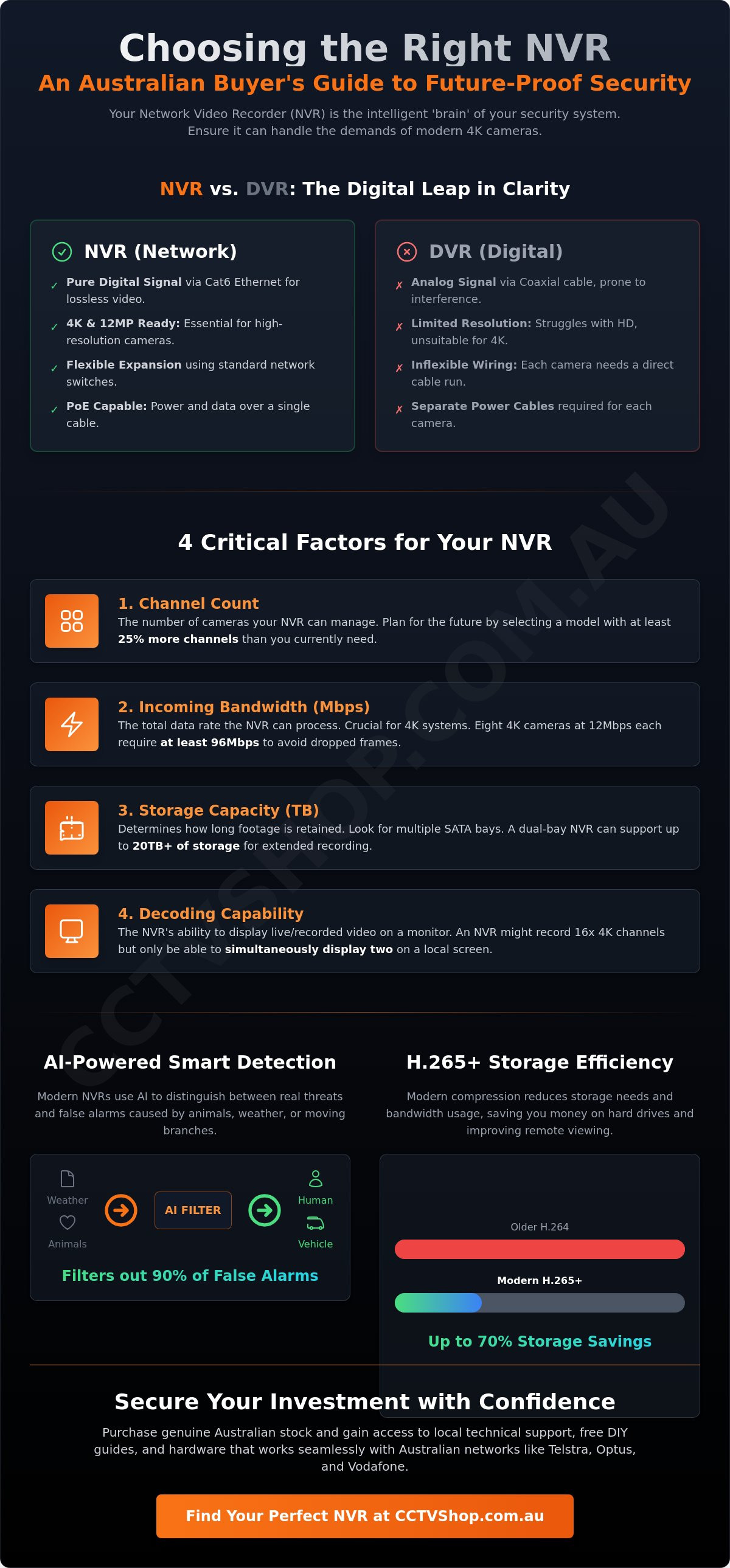
The transition from Digital Video Recorders (DVR) to NVR systems is defined by the shift from analog to digital data transmission. DVRs rely on coaxial cables that often struggle with signal interference and distance limitations. NVRs utilize Cat6 Ethernet cabling, which transmits pure digital signals without loss. This technical advantage is the reason why NVRs are mandatory for 4K (8MP) and 12MP surveillance. If you require the clarity to identify a number plate at 20 metres, the digital bandwidth of an NVR is the only viable solution. Furthermore, using network switches allows for incredible flexibility, enabling you to expand your camera network without running every single cable back to the main recorder.
The Power of PoE (Power over Ethernet)
Built-in PoE ports have transformed the installation process for DIY enthusiasts and professional installers alike. This technology allows a single Ethernet cable to carry both high-speed data and electrical power to the camera. It removes the need for a licensed electrician to install power points at every camera mounting point, significantly reducing total setup costs. When designing your system, it is vital to calculate the power budget of your recorder. A standard fixed 4K camera typically draws 5 to 7 watts, whereas a high-performance PTZ (Pan-Tilt-Zoom) camera with 150-metre infrared capabilities can require up to 30 watts. Using the 48V DC low-voltage standard provided by PoE is not only efficient but also safer for residential environments compared to traditional high-voltage wiring.
4 Critical Factors for Choosing the Right NVR
Selecting the right hardware requires more than just counting camera ports. It involves balancing data throughput with physical storage capacity to ensure your security system remains stable under load. When evaluating an nvr's performance, look beyond the price tag to the technical specifications that dictate how the system handles high-resolution video data.
- Channel Count: Most units are sold in 4, 8, 16, or 32-channel configurations. We recommend selecting a model with at least 25% more capacity than your initial camera count to allow for future property expansions without replacing the entire unit.
- Incoming Bandwidth: This is the total speed at which the NVR processes data from all cameras. For a 4K system, this spec is vital. If your NVR supports 80Mbps but you have eight 4K cameras running at 12Mbps each, you will experience dropped frames and lag.
- Storage Capacity: Check the number of SATA bays and the maximum Terabyte (TB) limit per drive. A dual-bay NVR can often support up to 20TB of total storage, which is necessary for long-term retention.
- Decoding Capability: This refers to the unit's ability to display video. An NVR might record 16 channels at 4K, but it might only be able to decode two of them simultaneously for local viewing on a monitor.
Calculating Your Storage Requirements
Modern systems use H.265+ compression to reduce storage needs by up to 70% compared to older standards. Understanding your storage options for video surveillance is the first step in building a reliable archive. You must use surveillance-grade drives, such as WD Purple or Seagate SkyHawk, which are designed for 24/7 write cycles. 4 cameras at 4K resolution typically require at least 4TB for 7 days of continuous recording. If you require longer retention, look for models with multiple SATA bays to expand your capacity.
Decoding and Playback Specs
There is a significant difference between recording resolution and synchronous playback limits. While an NVR might record at 8MP (4K), it may only support playing back 4 channels at that resolution at the same time. For local monitoring, ensure the unit features a 4K HDMI output to take full advantage of Australian UHD screens. To manage remote viewing, the system uses sub-streams. These lower-resolution versions of the footage ensure smooth mobile viewing even on limited NBN upload speeds, while the nvr's main stream continues to record in full detail on the hard drive.
If you are unsure which specifications match your property layout, you can browse our range of high-performance NVRs or contact our local team for expert advice on your specific setup.
Advanced AI Integration: Hikvision AcuSense vs. Dahua WizSense NVRs
Modern surveillance technology has moved beyond simple motion detection. An nvr's role in 2026 is to serve as an intelligent filter, distinguishing between genuine threats and environmental noise. By utilizing deep learning, these recorders effectively eliminate up to 90% of false alarms caused by heavy rain, wind-blown foliage, or local wildlife. This precision allows property owners to focus on what matters: Human and Vehicle Detection. Instead of scrubbing through 24 hours of video, you can search for a specific vehicle type or person in seconds, drastically reducing response times during an incident.
The transition from simple recording to active analysis represents a comprehensive and integrated approach to security that prioritizes actionable data over raw footage. To achieve this level of performance, brand ecosystem consistency is vital. While basic video streaming often works across different brands via ONVIF, advanced AI features like line crossing and face recognition usually break if the NVR and camera brands don't match. We always recommend pairing Hikvision cameras with Hikvision recorders to ensure full feature parity and stability for your Australian property.
Hikvision AcuSense NVR Features
Hikvision's AcuSense technology focuses on high-accuracy perimeter protection. The K-Series offers a professional entry point for residential use, while the I-Series provides the high-bandwidth performance required for larger commercial sites. These systems integrate seamlessly with the broader Hikvision security systems, allowing for a unified management experience via a single app. For high-security environments, the premium M-Series models introduce face recognition and attribute search, enabling you to find targets based on clothing color or age brackets. It's a level of detail that transforms an nvr's utility from a passive backup to an active forensic tool.
Dahua WizSense and WizMind Recorders
Dahua takes a similarly powerful approach with their WizSense and WizMind ranges. WizSense recorders utilize SMD Plus (Smart Motion Detection) to simplify alarm management, ensuring that only humans or vehicles trigger the system. These Dahua security systems also leverage NVR processing power for advanced analytics like heat mapping and people counting, which are invaluable for local retail businesses. A standout feature is AI Coding. By prioritizing the encoding of moving human or vehicle targets over static backgrounds, Dahua NVRs can save up to 50% more bandwidth and storage space compared to standard H.265 compression, providing better image quality where it counts most.
Standout NVR Recommendations for Australian Properties
Selecting the right hardware involves balancing your current security needs with future expansion. The market for nvr's in 2026 provides diverse options ranging from basic residential units to enterprise-grade servers. We categorise these based on property size and functional requirements to ensure you don't overspend on unnecessary features.
- Entry-Level: 4-Channel PoE NVRs are the standard for small homes or apartments. Expect a budget range of A$200 to A$350 for these units, which provide a compact footprint and simple plug-and-play setup.
- Mid-Range: 8-Channel 4K NVRs with 2 SATA bays serve most Australian family homes. These models, priced between A$400 and A$650, offer a balance of high-resolution recording and sufficient storage for two weeks of footage.
- Professional: 16-32 Channel I-Series or WizMind NVRs are designed for commercial warehouses and large estates. These units feature high-speed processing for advanced AI analytics and multiple hard drive bays for long-term data retention.
Buying "Genuine Australian Stock" is the most critical factor for long-term reliability. Local stock ensures your device receives critical firmware updates that patch security vulnerabilities. It also guarantees that local mobile apps, like Hik-Connect or DMSS, will function correctly without region-lock issues. We've seen many "grey market" units become bricked or lose app access after a manufacturer update, leaving the property owner without a working system.
Top Pick: Hikvision DS-7608NI-I2/8P
The Hikvision DS-7608NI-I2/8P remains the gold standard for Australian residential setups. It handles up to 80Mbps of incoming bandwidth, which is plenty for high-bitrate 4K streams. This model supports cameras up to 12MP resolution, ensuring you can upgrade your sensors without replacing the recorder. You can find this reliable workhorse in our NVR collection today.
Top Pick: Dahua NVR4208-8P-4KS2/L
Dahua's NVR4208-8P-4KS2/L offers exceptional value for those prioritizing smart detection. It features built-in WizSense AI, which allows for precise human and vehicle filtering even if your cameras are older models. The user-friendly interface is a favourite for DIY installers who manage their systems via the DMSS app. It sits comfortably in the mid-tier price bracket while delivering professional-grade performance.
Ready to secure your property with a professional-grade recorder? Browse our full range of genuine Australian NVRs to find the perfect fit for your security system.
Securing Your Investment: Why Buy Your NVR from CCTV Shop
Selecting the right hardware is only half the battle. The reliability of your surveillance system depends heavily on the support structure behind it. When you invest in one of our nvr's systems, you're buying into a long-term security partnership. We provide access to expert Australian technical support to assist with everything from initial IP configuration to complex troubleshooting. This local expertise is vital for ensuring your system remains operational when you need it most. Our team understands the specific networking environments and environmental conditions common across Australia.
To empower our customers, we include free DIY installation guides with every NVR purchase. These resources are designed to help you achieve professional-grade results without the expense of a third-party installer. Logistics are handled with the same level of care. We offer nationwide shipping with fully insured delivery across Australia. This protection ensures that your sensitive recording equipment arrives in perfect condition, ready for deployment. For maximum effectiveness, you should pair your recorder with the best home security cameras to ensure seamless software integration and total property coverage.
The CCTV Shop Advantage
We maintain a strict policy of only supplying local Australian stock. This means you avoid the firmware vulnerabilities and lack of support associated with grey imports. Our nvr's units come with a no-nonsense warranty process, handled right here in Australia. For those who want to avoid technical hurdles, we offer pre-configured kits that take the guesswork out of component compatibility. If your property has unique challenges, our specialists are available to provide a custom system design that fits your specific security goals.
Final Checklist Before You Checkout
Before you finalize your purchase, run through this quick list to ensure your system is complete and future-proof. Small omissions at this stage can lead to downtime later. Ensure your cart includes the following:
- Surveillance-Rated Storage: Did you include a surveillance-rated hard drive? Standard PC drives aren't designed for the 24/7 write cycles required by high-definition video.
- Channel Headroom: Do you have enough channels for at least 2 future cameras? It's much cheaper to buy extra capacity now than to replace the entire NVR later.
- Cabling and POE: Verify that your NVR has enough built-in POE ports for your planned camera layout.
Taking a proactive approach to your security setup provides a sense of calm and control. Our goal is to provide the technical reliability you need for long-term peace of mind. Explore our full range of NVRs and secure your property today.
Future-Proof Your Security Infrastructure Today
Selecting a high-performance recorder is the most critical decision for any 2026 surveillance strategy. You've learned that modern nvr's serve as much more than storage devices; they're intelligent hubs that utilize deep learning to filter out 90% of false alarms. Whether you prioritize the perimeter protection of Dahua WizSense or the target classification of Hikvision AcuSense, your choice dictates the long-term reliability of your property’s defense. It's essential to match your camera resolution with a recorder that supports high-bandwidth 4K streams to ensure every frame remains forensic-grade.
At CCTV Shop, we provide the technical expertise needed to navigate these complex specifications. As an Australian owned and operated specialist, we only supply genuine Hikvision and Dahua stock backed by local technical support. This ensures your investment is protected by valid local warranties and expert guidance. You don't have to guess which configuration suits your specific Australian property requirements.
Shop our curated collection of professional NVRs and take complete control of your site’s safety today. We're here to help you build a system that delivers total visibility and lasting peace of mind.
Frequently Asked Questions
What is the difference between an NVR and a DVR?
An NVR processes video data at the camera level using IP cameras, while a DVR processes raw video data at the recorder via coaxial cables. NVRs offer higher resolution capabilities and more flexible installation options for modern properties. Most high-performance NVR's support 4K resolution and advanced AI analytics that older DVR systems cannot handle efficiently.
How many channels do I need on my NVR?
You should choose an NVR with at least 25% more channels than your current camera count to allow for future expansion. If you're installing 6 cameras today, an 8-channel NVR is the standard entry point for most Australian homes. For larger properties requiring 12 cameras, a 16-channel unit provides the necessary headroom for additional perimeter protection later.
Does an NVR need a hard drive to work?
Yes, an NVR requires a dedicated surveillance-grade hard drive to store and playback recorded footage. Without a SATA hard drive installed, the system can only provide a live view of your cameras without saving any history. We recommend Western Digital Purple or Seagate SkyHawk drives. These are engineered for 24/7 operation and 90% write-time workloads common in security environments.
Can I use Hikvision cameras with a Dahua NVR?
You can use Hikvision cameras with a Dahua NVR if both devices support the ONVIF protocol. While basic video streaming usually works, advanced features like motion detection or smart AI analytics might not be compatible across different brands. For 100% feature parity and seamless setup, our specialists recommend matching your camera brand to your recorder's manufacturer.
What is PoE and why is it important for NVRs?
PoE stands for Power over Ethernet, a technology that allows a single Cat6 cable to provide both data connection and electrical power to your cameras. This eliminates the need for separate power supplies or complex electrical wiring at each camera location. Most NVR's sold in Australia include built-in PoE ports. This simplifies DIY installation and reduces total setup costs by roughly 30%.
How much storage do I need for 4K recording?
A 4K camera recording at 20 frames per second using H.265 compression typically requires 60GB of storage space per day. For a standard 4-camera system aiming for 14 days of continuous backup, you'll need a 4TB hard drive. Increasing your storage to 8TB ensures you have a safety margin for higher bitrates or longer retention periods required by Australian insurance standards.
Can I view my NVR footage remotely on my phone?
You can view your footage remotely using dedicated mobile apps like Hik-Connect or Dahua DMSS by connecting your NVR to your home router. These apps provide encrypted access to live streams and recorded events from anywhere with an internet connection. Our local technical support team frequently helps customers configure these secure P2P connections to ensure reliable 24/7 remote visibility.
Can I connect my NVR to the internet via Wi-Fi?
Most professional NVRs require a physical Ethernet cable connection to your router for stable internet access and remote viewing. While some entry-level consumer models support Wi-Fi, a wired connection prevents signal interference and ensures the high bandwidth required for 4K streaming. If your router is in a different room, a Powerline adapter or a wireless bridge provides a stable link without running new cables.