


Why are you still paying a A$15 monthly subscription for a security camera that alerts you every time a spider crawls across the lens? Many Australians find that off-the-shelf Wi-Fi cameras offer more frustration than actual security, especially when searching for a reliable cctv camera for home use that performs when it matters. You're likely tired of grainy night vision and the constant anxiety of your private data sitting on a vulnerable cloud server. We agree that true protection should be local, high-definition, and entirely under your control.
This guide provides a professional-grade roadmap to planning and DIY-installing a surveillance system that outperforms standard consumer gadgets. You'll learn how to achieve crystal clear 4K footage, implement AI-driven person detection to eliminate false alarms, and secure your property without any ongoing storage fees. We will walk you through everything from selecting the right network video recorder to positioning your cameras for total perimeter protection. By the end, you'll have the expert knowledge needed to build a robust security network using premium Australian stock.
Key Takeaways
- Understand the reliability gap and why professional PoE-powered systems outperform consumer Wi-Fi cameras in demanding Australian conditions.
- Learn how to select the ideal cctv camera for home by prioritizing 4K resolution and matching specific camera form factors to your property’s layout.
- Discover the step-by-step process for mapping critical entry points and selecting a Network Video Recorder (NVR) tailored to your storage requirements.
- Gain professional techniques for optimizing camera angles and configuring secure remote access for smartphone viewing via Hik-Connect or DMSS.
- Navigate Australian privacy laws and maintenance schedules to ensure your high-performance security system remains both legally compliant and technically sound.
Understanding Home CCTV: Consumer Gadgets vs. Professional Systems
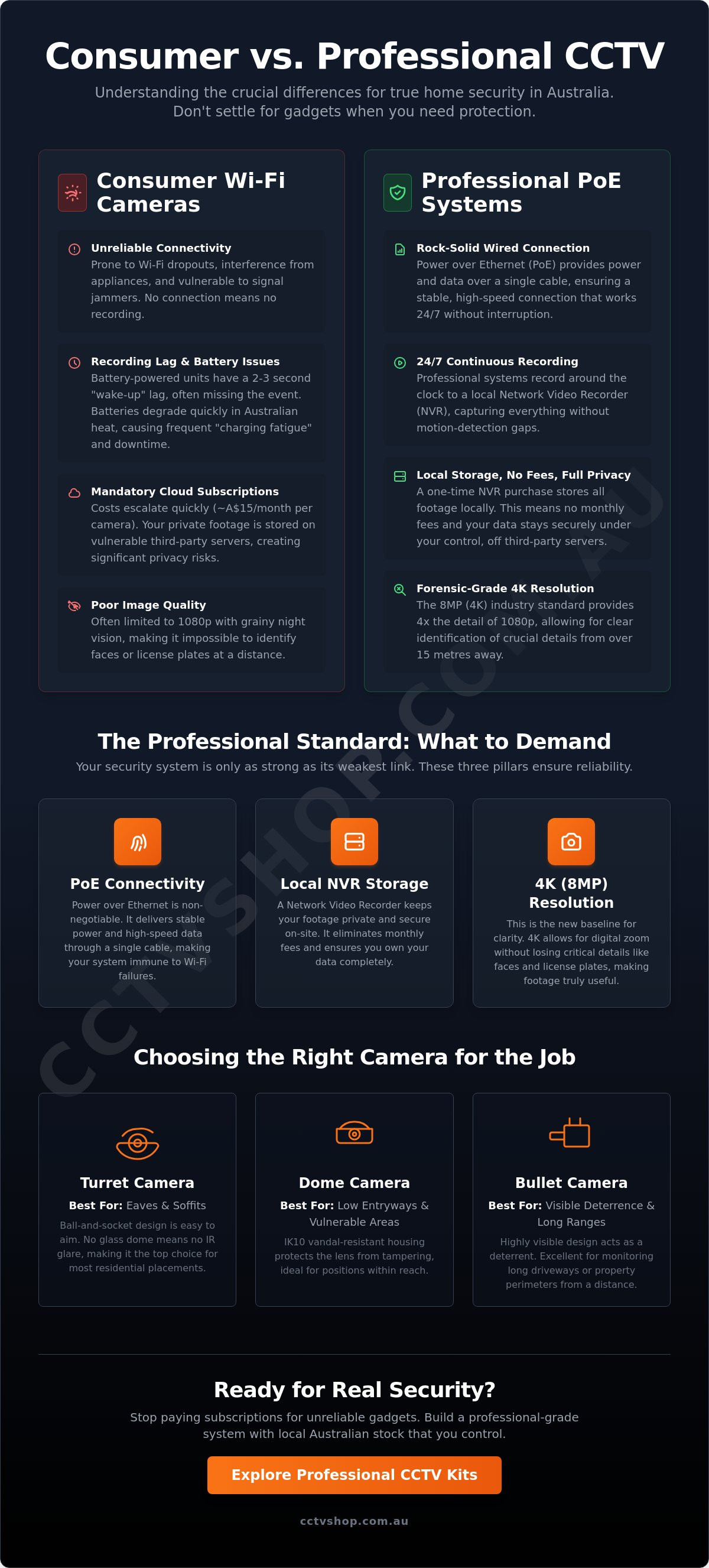
Professional home security has evolved beyond simple plug-and-play gadgets. A true professional cctv camera for home setup relies on three pillars: IP-based cameras, Power over Ethernet (PoE) connectivity, and a dedicated Network Video Recorder (NVR). Understanding Home CCTV: Consumer Gadgets vs. Professional Systems is the first step in moving from basic monitoring to actual security. While consumer-grade Wi-Fi cameras are popular for their low entry cost, they often fail during critical moments. Professional systems provide 24/7 continuous recording and high-speed data transmission that isn't throttled by your home router's wireless bandwidth.
The "Reliability Gap" is a significant factor for Australian homeowners. Wired systems bridge this gap by providing a constant physical connection. In Australia, where summer temperatures often exceed 40 degrees Celsius, electronic components face extreme stress. Wired PoE systems dissipate heat better than compact, battery-reliant units. Storage is another differentiator. Cloud subscriptions can cost upwards of A$150 per year per camera, whereas an NVR stores data locally on surveillance-grade hard drives. This eliminates monthly fees and keeps your private footage off third-party servers, ensuring your privacy remains under your control.
Industry leaders like Hikvision and Dahua define the professional standard with enterprise-grade sensors and advanced AI analytics. For those seeking a more budget-friendly entry point without sacrificing the stability of a wired backbone, HiLook offers a cost-effective alternative. These brands focus on long-term value and hardware durability rather than just flashy software features.
Why PoE (Power over Ethernet) is the Gold Standard
PoE technology simplifies installation by sending power and data through one Cat6 cable. This creates a closed loop that's immune to Wi-Fi signal jammers or interference from household appliances. Stability is the priority here. Your home security cameras are only as good as their connection uptime. If the Wi-Fi drops out, the recording stops. PoE ensures the camera stays online as long as the NVR has power, providing a seamless cctv camera for home solution that works every second of the day.
The Problem with Battery-Powered Wi-Fi Cameras
Battery cameras often suffer from "charging fatigue." Homeowners frequently stop climbing ladders to recharge units after the first year of ownership, leaving the home vulnerable. These cameras also use PIR sensors to "wake up" when motion is detected, which often results in a 2 to 3 second lag. By the time the camera starts recording, the subject has often moved out of the frame. Additionally, the harsh Australian sun degrades lithium-ion batteries rapidly. A battery that lasts six months in a laboratory might only last eight weeks in a Western Sydney or Queensland summer, leading to frequent maintenance and system downtime.
How to Choose the Right Camera Types for Your Property
Selecting a cctv camera for home use in 2026 requires looking beyond basic recording. Professional standards have shifted. 4K (8MP) resolution is now the baseline for any reliable residential system. This level of detail isn't just about a prettier picture; it's about forensic utility. An 8MP sensor provides four times the detail of 1080p, allowing you to identify a person's features or a vehicle registration at distances exceeding 15 metres. High-resolution sensors ensure that your evidence remains actionable when it matters most.
Dome vs. Turret vs. Bullet Cameras
The physical shape of your camera dictates where it performs best on an Australian property. Turret cameras are the primary recommendation for residential eaves. They feature a ball-and-socket design that simplifies adjustment during the installation process. Because they don't have a glass dome cover, they aren't susceptible to the "halo effect" or spider web reflections caused by infrared light bouncing off dust or moisture on the lens.
Dome cameras are better suited for low-hanging entryways or areas within reach of potential intruders. Their IK10 vandal-resistant rating protects the lens from physical tampering. Bullet cameras serve as a visible deterrent. They're often installed high on walls or poles to monitor long driveways. Their protruding design makes it clear that the property is under surveillance, which can often stop an incident before it begins.
Smart Features: AcuSense, ColorVu, and WizSense
False alarms used to be the biggest drawback of home security. Modern AI detection has solved this. Hikvision’s AcuSense and Dahua’s WizSense technologies use deep-learning algorithms to filter out background noise. These systems specifically identify human and vehicle shapes. You won't receive a notification every time a pet runs across the yard or the wind moves a tree branch. This precision gives you back control over your mobile alerts and reduces digital clutter.
Night vision has also seen a technical revolution. Traditional infrared (IR) cameras provide black-and-white images that often wash out facial features. ColorVu and Full-Color technologies use advanced lenses and high-sensitivity sensors to capture vivid colour in near-total darkness. This allows you to identify the specific colour of a vehicle or a person's clothing at 2 AM. You can find a detailed breakdown of these technologies in our best home CCTV system Australia checklist.
If you're still weighing up which model suits your specific floor plan, reach out to our local support team for expert advice on building a comprehensive security layer for your property.
Step-by-Step: How to Plan Your DIY CCTV Installation
Success with a cctv camera for home starts with a detailed site map. Walk around your property to identify high-risk zones like side gates, garage entries, and front porches. You need to position cameras to cover these entry points while overlapping fields of view to eliminate blind spots. A common mistake is mounting cameras too high; keeping them at 2.5 to 3 metres ensures you capture facial details rather than just the tops of heads. This height also keeps the hardware out of easy reach for vandals while maintaining a clear line of sight.
Choosing Your NVR and Hard Drive
Your Network Video Recorder (NVR) is the brain of your system. For a standard Australian home, we recommend an 8-channel NVR even if you only plan for four cameras. This provides a clear expansion path without needing to replace the core unit later. Ensure the NVR's incoming bandwidth supports 4K streams; a 4K camera typically requires 8Mbps to 10Mbps of bandwidth. Always use surveillance-rated hard drives like WD Purple or Seagate SkyHawk. Unlike standard PC drives, these are engineered for 24/7 write cycles and handle the heat of constant recording. A 4TB drive generally provides 7 to 10 days of continuous 4K footage for four cameras, though switching to motion-only recording can extend this to several weeks.
The DIY Installation Workflow
A reliable cctv camera for home setup depends on high-quality infrastructure. Following a logical sequence prevents rework and ensures a professional finish.
- Step 1: Running Cat6 cables. Pull Cat6 cabling from your NVR location to each camera point. Cat6 is the preferred standard for its superior data throughput and PoE (Power over Ethernet) efficiency over long distances.
- Step 2: Mounting with junction boxes. Use waterproof junction boxes for every camera. These protect the RJ45 connection from moisture and corrosion, which are leading causes of system failure in coastal Australian climates.
- Step 3: Terminating and connecting. Terminate your cables using the T568B standard and plug them into the PoE ports on your NVR. This single cable provides both power and data, which simplifies the wiring process significantly.
Before you start, verify your hardware checklist. You'll need a crimping tool, a cable tester, and UV-stabilised conduit if cables are exposed to the sun. If you're unsure about cable paths through your roof space, our local technical support team can provide expert advice to ensure your installation meets Australian standards. This solution-first approach ensures you get the most out of your hardware from day one.
Optimising Your System for Maximum Security
Installing a cctv camera for home use is only half the battle. To get the most out of your 2026 security setup, you need to move beyond default settings. Most DIY installs fail because they capture the tops of heads rather than identifiable facial features. Aim for a mounting height of 2.4 to 3 metres. This height provides enough clearance to prevent tampering while maintaining an angle steep enough to record faces clearly as people approach your entry points. If the camera is too high, you'll only see hair and hats, which offers little value to local authorities during an investigation.
Mobile Alerts and Remote Viewing
Configuring remote access no longer requires the security risks of manual port forwarding. Modern systems from Hikvision and Dahua use secure P2P (Peer-to-Peer) technology. By scanning a QR code into the Hik-Connect or Dahua DMSS app, you gain instant access to live feeds. It's vital to customise your notification schedules. You don't need alerts while you're home on the weekend; set the system to push notifications to your smartphone only during work hours or late at night. If you're building a hybrid system, check our wireless security cameras guide for professional integration tips.
Placement Strategy for Australian Homes
Australian properties face unique challenges, particularly the harsh glare of the afternoon sun. Ensure your cameras feature at least 120dB True WDR (Wide Dynamic Range). This technology balances high-contrast scenes, preventing your front porch from looking like a dark silhouette against a bright street. Focus your coverage on the "Golden Triangle" of residential security: the front door, side access gates, and the rear alfresco area. These three points account for over 75% of residential entries based on recent Australian police data. By prioritising these zones, you ensure your cctv camera for home protection covers the highest-risk areas effectively.
Go beyond simple motion detection by setting up smart "Line Crossing" and "Intrusion Detection" zones. Standard motion alerts often trigger from swaying trees or pets. Smart zones allow you to draw a virtual line across your driveway or fence. You'll only receive an alert if a human or vehicle crosses that specific boundary. Integrating a video doorbell into this ecosystem creates a seamless first line of defence; it allows you to speak to couriers and deter prowlers before they even reach your main structure.
For tailored advice on the best configuration for your property, speak with our expert team for local technical support and Australian stock solutions.
Maintenance and Legal Compliance for Home Surveillance
Security hardware also requires digital maintenance. Manufacturers release firmware updates to patch security vulnerabilities and improve device performance. Skipping these updates leaves your network exposed to cyber threats. We recommend checking for updates every 6 months to ensure your system remains secure against evolving digital risks. This proactive approach ensures your "set and forget" system doesn't become a liability.
Privacy and the Law
Australian surveillance regulations are governed by state-specific legislation, such as the Surveillance Devices Act in New South Wales or Victoria. You must position your cameras so they do not peer directly into a neighbour’s private zones. This includes windows, bedrooms, or backyards where people expect seclusion. In a residential context, a reasonable expectation of privacy is the legal assumption that an individual's private activities will not be observed or recorded in locations where they have a justified right to seclusion.
- Signage: While not always mandatory for private homes, clear signage acts as a powerful deterrent and can simplify legal proceedings if footage is needed for evidence.
- Public Space: You are generally permitted to record the street or your own driveway, provided the primary focus remains on your property boundaries.
- Audio Recording: Be cautious with audio; recording private conversations without consent is a serious offence in most Australian jurisdictions.
The CCTV Shop Advantage
When you invest in a cctv camera for home protection, the source of your hardware matters. Many online marketplaces sell "grey market" stock that lacks local firmware and cannot be updated through official Australian channels. We only supply genuine Australian stock, which guarantees you receive a full manufacturer warranty and hardware designed for local conditions. This ensures your system remains functional and supported for its entire lifespan.
Our role as a trusted specialist extends beyond the sale. We provide local technical support to assist DIY installers with configuration and troubleshooting. This professional consultation removes the guesswork from your security setup, providing the peace of mind that comes from a correctly configured system. Ready to secure your home? Browse our Hikvision kits today and experience the benefit of expert-led security solutions.
Take Control of Your Home Security Today
Selecting a high-quality cctv camera for home protection in 2026 is about more than just buying a gadget; it's about building a reliable surveillance ecosystem. You've seen how professional-grade hardware from Hikvision and Dahua outperforms consumer-grade alternatives, offering superior clarity and dependable storage. Successful DIY installation depends on careful planning and adhering to Australian privacy standards to ensure your footage remains useful and legally compliant. Since 2012, CCTV Shop has operated as a 100% Australian owned specialist, providing genuine local stock to homeowners nationwide. We provide free technical support to every DIY customer, so you'll have expert guidance during every step of your system configuration. Professional security doesn't have to be complicated when you have the right local partner supporting your installation. Take the next step toward a safer property by choosing equipment designed for Australian conditions and long-term performance.
Upgrade your home security with professional-grade CCTV kits from CCTV Shop
Frequently Asked Questions
Do I need a license to install my own CCTV camera for home in Australia?
You don't need a security license to install a plug and play cctv camera for home if you're the owner-occupier. However, the ACMA (Australian Communications and Media Authority) requires a licensed cabler for any permanent data or power cabling behind walls or in ceiling cavities. In states like NSW, the Security Industry Act 1997 dictates that anyone installing security equipment for "fee or reward" must be licensed. For a simple DIY wireless setup, you're compliant.
How much storage do I need for 4K security cameras?
A single 4K camera recording at 20 frames per second requires approximately 45GB of storage per 24-hour period using H.265 compression. To store 14 days of continuous footage for a standard 4-camera system, you'll need a 4TB surveillance-grade hard drive. If you use motion-triggered recording instead of continuous, this 4TB drive can often store over 60 days of high-definition events. Always choose Western Digital Purple or Seagate SkyHawk drives for 24/7 reliability.
Can I view my home security cameras on my phone when I am away?
You can view your cctv camera for home live from anywhere in the world using a secure mobile app. Most modern systems provide free remote access via P2P (Peer-to-Peer) technology, which avoids complex router configurations. This setup requires an active internet connection with an upload speed of at least 2Mbps for 1080p streaming or 5Mbps for 4K clarity. You'll receive real-time push notifications if the system's AI detects a person or vehicle.
What is the difference between an NVR and a DVR?
The primary difference lies in how they process video data and the cables they use. A DVR (Digital Video Recorder) processes data at the recorder and typically uses older coaxial cables. An NVR (Network Video Recorder) encodes and processes data at the camera level before sending it through Ethernet cables. NVRs are the industry standard for 2026 because they support higher resolutions, often exceeding 12MP, and provide better scalability for modern Australian homes.
Do CCTV cameras work during a power outage?
Standard mains-powered security cameras stop functioning immediately during a power outage unless you've installed an Uninterruptible Power Supply (UPS). A 1500VA UPS can typically keep a 4-camera NVR system running for 30 to 60 minutes. For longer protection, battery-powered wire-free cameras or solar-integrated models provide independent operation. These alternative power sources ensure your perimeter protection remains active even when the local grid fails during a storm.
Is it better to have wired or wireless security cameras for home?
Wired PoE (Power over Ethernet) systems are superior for long-term reliability and data security. While wireless cameras offer faster installation, they're susceptible to signal interference from household appliances and 2.4GHz Wi-Fi congestion. A wired connection provides a consistent 100Mbps data stream and eliminates the need to recharge batteries every few months. For a permanent security solution, professional installers almost always recommend a hardwired infrastructure to avoid signal dropouts.
How long do security cameras usually last in Australian weather?
High-quality cameras with an IP67 weatherproofing rating typically last between 5 and 10 years in Australian conditions. Our local climate exposes hardware to extreme UV radiation and temperatures exceeding 40 degrees Celsius. To ensure longevity, choose cameras with powder-coated metal housings rather than plastic. Regular maintenance, such as cleaning the lens every 6 months, prevents salt spray or dust buildup from degrading the image sensor's performance.
Can I mix different brands of cameras and recorders?
You can mix different brands if both the camera and the recorder are ONVIF (Open Network Video Interface Forum) compliant. While basic video streaming usually works, advanced features like AI human detection, siren triggers, or thermal mapping often fail when mixing manufacturers. For 100% feature compatibility and seamless technical support, it's best to stick to a single ecosystem. This ensures all firmware updates and smart features work together without software conflicts.